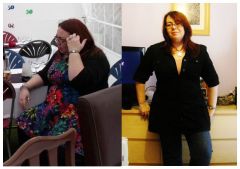
Jojiblossom
Gastric Sleeve Patients
-
Joined
-
Last visited
-
Jojiblossom, a weight loss surgery photo album by Jojiblossom on BariatricPal. 3 photos in Before and After Gastric Sleeve Photos.
-
Hi. I used to get restless legs a lot before surgery. I dont know what causes it but my mum gets it too. Taking magnesium supplements helped and you should be able to buy a gel from your local chemist/pharmacy for restless legs. The gel is made from horse chestnut. It was the only thing that let me sleep!
-
I'm doing great thanx. I'm now 3 and a half months out and I've lost 4 stone. I'm half way there! I thought I noticed a little hair loss but it seems to have stopped since I got my hair cut. Still early days though so I won't be surprised if it kicks off again soon.
-
Hi everyone. I'm Jo from Brighton. I was sleeved on the 12th Oct so I'm 10 days post op now and still on liquids. I think the worst of the headhunger is behind me now. I had a few days of craving everything I saw. Can I ask... for those of you who've been sleeved a while, did you get hair loss? A lot of the Americans are saying they had hair loss at 3 to 4 months which didn't come back til 8 or 9 months post op. I'm just curious. I can hear Ebay calling me to buy some groovy wigs! I was told that hair loss is a sign of general malnourishment but so many people seem to get it that I'm wondering if it's just one of those things to expect or if it's a dietary difference from country to country.
-
-
-
-
-
I had no idea just how tiny my stomach was afterwards. The width of a pen? That's mental. But very helpful. Now I'm much less inclined to cheat than I might have been before.
-
Yes the people around us are allowed to make their own food choices. Of course they are. No-one is saying otherwise. I just don't think it's too much to ask of someone who loves you to be a little considerate about eating certain foods around us as we heal. I wouldn't have dreamt of eating chocolate around someone who couldn't have it and I hope people would have the same courtesy for me as I do them. Especially if they are loved ones.
-
-
Why do people find it funny to wind you up? A girlfriend of a friend, after being told what I'd done, later on ran into the lounge and waved a box of chocolates at me saying 'ooooh just one!'. I'm up for a laugh but that's just utterly juvenile and actually quite mean! And family that munch on loads of crappy foods in front of you need telling to be a lot more considerate. My dad did it once but he was tired and peckish and forgot about my op. He was really sorry and made sure to not do it in front of me after that.
-
-
-
-
I think I watched this one the week before my surgery. I found it really interesting and helpful. I'm going to watch the hour long one tomorrow. Thanx for the link.
-
Hiya ladies. I'm craving everything I see and I'm only 8 days out. I know I couldn't eat it cos I can hardly eat the stuff I'm supposed to but it's driving me mental. My dad sat and ate a packet of my favourite crisps (potato chips) in front of me 2 days ago (he forgot) and ever since then I've really wanted a packet. I've got another week on liquids. I'm dreading the pureed weeks. I cannot wait to have some mashed potato and fish and I don't even like fish that much! Maybe the fact that I'm not enjoying any of the soups I should be eating is exacerbating my desire for stuff I can't actually have. I can't help thinking that if I could find something savoury that I actually enjoyed, it might solve some of the cravings.
-
-
Flip. I need to find me a husband!
-
-
I wish mine didn't. I'm desperate to get onto soft foods! I'm craving a piece of fish and I don't even like fish!
-
-
I agree with Circa. Find a laxative. My hospital gave me a bag of meds to take home which included a bottle of lactulose for just in case, so it must be a common problem.
-
I was about 4 or 5 days in when that end started working again. Today it's doing overtime! It apparently objects to tomato soup. I was told to expect a bm every two to three days to start with.
-
Two weeks seems really early to be starting solids. Are you finding it difficult so soon? I guess each surgeon has their own guidelines for us to follow. Mine says 2 weeks liquids, 2 weeks pureed, 2 weeks soft food and then solids after 6 weeks. They also say if you're finding it difficult, go back a step for a little while longer.
-
Glad you're starting to feel better. I found it easier to sit with the family whilst they ate rather than hear them from the other room as it also encouraged me to get more of my liquid meal down but as the days go by it's getting harder. Resisting the urge to lick their food. Haha. My dad ate a packet of my favourite crisps/potato chips yesterday and that was my hardest moment so far. I think the mental food stuff is really kicking in now. I'm looking forward to eating again too!