Trinity31188
Gastric Sleeve Patients
-
Joined
-
Last visited
-
-
-
-
My progress
-
-
-
Good luck! We will be praying for your speedy recovery.
-
-
-
-
-
-
-
-
-
-
-
This morning after months of trying to get approval, my sister had her surgery. Now we are not only family, we are sleeve sisters. I am so proud of her. As I watch her peacefully sleeping in this hospital room I am reminded of all the pain I went through on my surgery day back in December... Sleep now big sister, for the struggle that comes when you wake is only the beginning of your new life and like a butterfly from it's cocoon I know you'll show everyone the vibrance and beauty within you. I love you.
-
Congratulations!
-
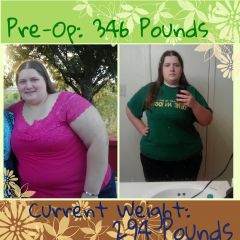
Sleeved 12/18/12: Weight on day of surgery-330 Current weight- 298.4 down 31.6lbs since surgery date down 48.4lbs since start
-
That's right, my first milestone!. My journey started 50lbs ago and I'm finally seeing my progress. my current weight: 298.4. I'm so excited I'm euphoric. I just had to let everyone know!
-
Hey Aaron, you're not alone. 2 weeks out I was still pretty sore too. It's usually different for some than it of for others. At two Weeks I still needed help getting out of bed if I ended up on my back. Just take it easy and relax a bit. Don't try to over do it by lifting too much, and most importantly, walk.... Walk and keep walking. Hope this helps you out.
-
Trying to stay positive, it would seem my sleeve isn't ready to move past liquids. Still gagging a bit. hopefully i can get some sleep later.
-
Congrats MrsGina! Do you have your surgery date yet?Good luck Aurorab! I'm exited for you! I hope you get good news soon!Well, my insurance is blue cross blue shield. My requirements were 3 months on a dietitian monitored diet, 2 years (min.) weight history, Post-op preparation classes, and a bmi of 35 or higher. That would have been ok... But i started out in march with Dr. David Kim... I do not recommend anyone to his office. #Hurley911 - Some of the red tape/hoops I had to go through were nicotine and alcohol screening and things like that. The other problem I had was that after doing all the requirements for not only my insurance but my doctor... They stopped contacting me and i was forced to change surgeons. It has been a very long journey but it will be worth it when I finally get sleeved.I got my approval! I'm super excited! After so many months of waiting and jumping through hoops and cutting through the red tape I've finally gotten my approval. My scheduled surgery date is the 18th of this month. Thirteen days! I can't wait!These are some recent pictures taken between september and november 2012Trinity31188, a weight loss surgery photo album by Trinity31188 on BariatricPal. 1 photo in Before and After Gastric Sleeve Photos.