judy79
Gastric Sleeve Patients
-
Joined
-
Last visited
Everything posted by judy79
-
Oh, you didn't have to say all that lol. I always see someone username Ann2 posting on there often
-
Yes, I was desperate and it was cheaper and I was in a hurry. I'm going to get it repaired here. I'll go back for liposuction later on. My health comes first. Ann are you the same one with blonde bombshell avatar on gastricgastricsleeve.com?
-
Thanks I'm just praying till I get to the bariatric specialist to know exactly what is what. Gastrointestinal Dr is sending referral this week
-
I'm not banned lol. I Don't see it. And with God and patience I'll get my lipo done later after repair to my stomach. Thanks for the well wishes:)
-
Thank you
-
I don't know how to post a picture here of endoscopy results. My sleeve don't go up and down straight. He sewed a pouch at the top. I have a large man made hernia at the top and it holds food in it, when I lay down burns my throat from acid reflux. I'm being referred to a bariatric specialist next week
-
I had planned to go to DR Oscar Rafael Gastelum in July. Now insurance bouncing around to do sleeve revision to bypass thanks to Dr Quinones. He created a hernia at the top of my stomach. Dr Gastelum I'll see you when this is fixed:)
-
He made the stupidest error with my Sleeve. Now I need revision to bypass. Thanks a lot to Dr Quinones pos!!!!
-
Well turns out with my endoscopy Dr Quinones botched my Sleeve completely. He created a hernia at the top of my stomach that is a pouch to hold food and cause difficulty. I believe the insurance here will cover it. So I'm not doing 2 procedures together, I'm taking care of my stomach here then about 3-6 months after I'll go to DR Oscar Rafael Gastelum in Tijuana for liposuction. This is saddening because my life is now at a stand still because of Dr Quinones
-
Yes I have a few months to research. Thinking July
-
I'm getting a little lip too at same time. So bariatric surgeon who works with plastic surgeon Rafael Gustelum is Dr Jesus Lopez. So it's looking more like lopez. If stomach isn't properly sized or shaped it can twist and flip from the inside.
-
Thanks so much, I'm so ready to do this and be done. We all deserve to love ourselves and be healthy!
-
I was 240 pounds and did the Gastric Sleeve with Dr Quinones in March 2013. Every thing seemed fine, until I felt like my stomach was turning from the inside. That was later on, I asked Melanie Hensen whom works with Quinones and she assured me it was normal and it would pass. More time went by and it got stuck where I had to go to the Emergency room at Ben Taub here in Houston. They took me in for surgery and removed some staples that weren't done correctly and weren't even staples for the Gastric sleeve surgery. So it was an emergency situation and seemed to temporarily fix the problem. I went for plastic surgery January 2014 had tummy tuck, lipo, and fat transfer to the butt. I'm happy with my results and feel the sexiest I ever fely, but stomach flipping again and when it does I can see a bulge in my belly. So I'm going back for a round 2 of lipo and also for the surgeon to go in and reshape my sleeve at the same time. Would have to be 2 surgeons, and since I don't have much to lipo they say it's more than likely doable. I know I'll be on the liquid pre op and post op diet and that's fine. I'll be done with this stomach flipping nightmare and get a little lipo on hips and waist. I'm so excited I can hardly stand it!
-
go for it, don't lift over 10 pounds for 6 weeks and you will be fine. Not 100%, but you won't be down in bed and not enjoying it all. You will be fine!
-
Congrats!!!!
-
I hear great things about him. Of course I presonally think my Dr is #1. I hear that Dr. Ponce is good:) you have nothing to worry about, people go to Mexico everyday for surgery!
-
I didn't go, but being on these boards for a year I hear great things about Perez and Ortiz. They are both highly recomended. Of course I think my Dr is #1 lol. But for Cancun, check those 2 out:) You can also go to Gastric Sleeve.com and find out alot about more Dr's in Cancun!
-
Many worry, but if you don't have any real health problems or a fatty liver you should get your surgery, If something is really wrong any good surgeon won't oporate! Things such as heart conditions, breathing issues, anemia, or any disease that they might find like HIV ect. Cholesterola nd Diabetis are common and won't stop this surgery:)
-
I went to Dr Quinones and it was $4500 with no extra fees. I got in when it was $4000 thankfully. I was treated very nicely,a nd he and the hospital were great!!!
-
I use to be one, and no. The company takes care of your fees. And no I am not any longer lol:)
-
It depends ont he Border Patrol, some let you slide with only DL and BC. If thats all you have plan to go to the airpost 4 hours ahead of your flight and you are subject to a fine of $150. Some still go that route because its rare that they say anything!
-
I agree, show some of your Surgeons testimonies and let them follow some of his patients on FB groups, or on here. That might help put them at ease:)
-
You have to do it for you so you can be a better parent, and person in general. You are investing in yourself! I was completely confident and had zero fear of going to Mexico after all my research!
-
Yes, but after 4 bites the urge is gone lol.
-
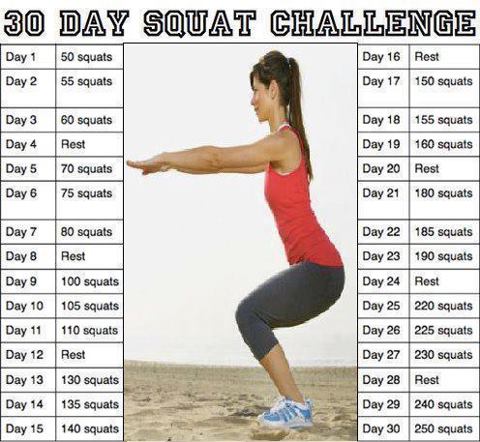
I am on day 4 and that with a Pure protein bar a day added to my diet ansd down almost 4 pounds, can't wait to see what the next 26 days will bring. The squat doesn't take long,and is one of the most complete excercises there is!!! Who is in?? Lets do this!!!