twinRN
Gastric Bypass Patients
-
Joined
-
Last visited
Everything posted by twinRN
-
Thanks ladies It is pretty cool! Hope you both are getting the results you want too!
-
I too am loosing hair. I am almost 5 month out. I also had thick hair to begin with, but wow, can't imagine what people with thin hair encounter. I've heard some say Biotin, but I also heard it doesn't work and there is nothing we can do
-
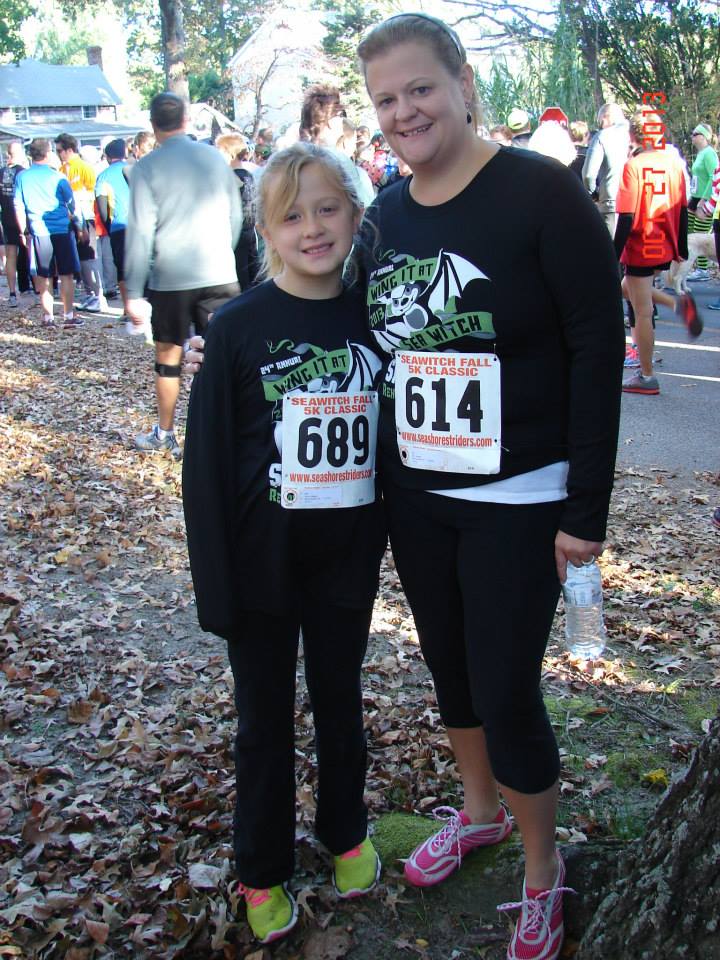
I am 4 days shy of 5 months post-op from my RNY. I have NO REGRETS (except not doing it sooner!). My highest weight was 217 with a BMI of 38/39. I have lost 62lbs from my highest weight and 53lbs from my surgery day weight. I am loving life. I feel good and look good!! 7 wks after surgery, my triglycerides (fat in your blood, similar to cholesterol) were normal, and my fasting blood sugar was normal. My labs were perfect! I can eat almost anything as long as I don't eat too fast and too much. Now sweet stuff...I can have a bite or two. Like this Halloween, hard to stay away from the candy, but I could have a fun size candy bar and be fine. If I had 2 in a row (I did once), not good. My dumping is a rapid heart rate and feeling a little breathless and anxious and nausea. chicken is a little more difficult because it is not as moist as other food, but I made a chicken in the crockpot recently and with gravy, I could have 4 oz of that. Yummy. I don't have much in the way of hanging skin issues except between my upper thighs, no so pretty, but oh well. It doesn't bother me a bunch and I will try to save to have a "leg lift" eventually. I still have my boobs and they aren't sagging too much more than they were before, lol. I'm still a D-cup although before surgery I really should have been a DD but I was in denial . My stomach isn't so bad but I had a tummy tuck already in 2007 so I think that has helped. I tried to upload some pics but I don't have good before and after pics because I hated my pic being taken and I haven't taken an "official" after pic yet. The after pic was on Oct. 27th. My surgeon thinks I will loose another 20-30lbs, but if I don't, I wouldn't care. I'm very happy with me right now. I was a size 18 and now I am a size 10!


-
twinRN, a weight loss surgery photo album by twinRN on BariatricPal. 2 photos in Member Photo Gallery.
-
Thanks for the inspiration! I'm 4 weeks out today and feeling pretty good, but discouraged about my weight loss. I've only lost 16lbs . Do you remember what you had lost at a month out?Nope, didn't lose any weight during the 6 months. I was 212.5 when I weighed in on the 1st class and went up to 217.5 then on my last class I got back down to 212.5. According to my surgeon's office though it wasn't a requirement for me to lose during the 6 months just that it probably wasn't good for me to gain.I am on day 7 of my pre-op diet and it SUCKS! Sorry to be a downer, but it does. My doctor requires we do Bariatric Advantage shakes, 4 a day with 1cup of vegetables, raw and 1cup of raw fruit and broth. Anyway if the shakes are horrible tasting. It's just a lot of liquid. I'm not cheating except for a bite here and there but rather just not eating much, not drinking the shakes. I'm losing weight, but still this diet is giving me just another reason to look forward to surgery! My surgery is on Monday the 17th.YoColeFleet...Good luck to you! and thanks From the health problems you said, I would think you would be approved too. What is your insurance?Just got the call today from my surgeon's office....APPROVED and surgery is June 17th! It took 2 wks to the day to get approved and I have Highmark Blue Shield PPO. I am a school nurse so off for the summer, yay! Insurance covers 100% w/ no out of pocket...so blessedSo I got a call from my surgeons office today and I'm approved!!!!!!!!!!!!!! So I wanted to post because during my 6 months, I looked at postings to get hope. I live in PA, and I have Highmark Blue Shield PPO. Clearly I'm totally excited but wanted to share my "stats" like I said so others can compare... My surgeon's office submitted exactly 2 weeks ago and I got the call at 11:30am today that I'm approved! My date for surgery is June 17th! I'm 35, 5'2" and 212lbs so that makes my BMI 38.9 and I was told that is rounded up so it is 39. My insurance is like many others...with a BMI of 40 or higher, sleeve, band or RNY is covered 100% with no out of pocket and with a BMI of 35-39, WLS is only covered w/ co-morbidities. My co-morbidities aren't all that significant, but they worked! I have high triglycerides. Normal is 150 or lower and mine at the start of the 6 months were in the 180's (they were in the 300's but I go them down w/ exercise). My only other co-morbidity is high fasting blood sugar, not diabetes. Normal fasting blood sugar should be in the 80's to 90's, but mine are anywhere from 100 to 110's. Fortunately my PCP and my surgeon gave me a diagnosis for this (yay them:). My PCP documented it as "Impaired Fasting Glucose" and my surgeon said "metabolic disorder". In all seriousness, the high fasting blood sugar is a good indicator that I would have developed type II diabetes so it should count for something. Also as an FYI, I actually gained 5lbs in the 6 months so my highest weight was 217, but I did lose that five lbs for my last weigh-in. I'm a nurse so this all is easier for me to understand, but any questions please ask:) Anyway, I hope this is helpful to others like me that were worried the whole 6 months that they might not be approved. Wish me luck! My identical twin goes for her RNY on 6/3 too so we get to go through the good and bad together!Why do you have an open wound? I'm a nurse and having surgery in June so I'm curious. I've done a lot with wound care also so maybe I could put your mind at ease with some success storiesI'm pre-op but thought I read somewhere that the loss of ghrelin produced by the part of the stomach removed can make you cold.I'm in a similar situation w/ BMI, but do have accompanying health problems. My insurance is harder to cover the sleeve than the bypass (stupid since bypass is more drastic, but it's because the sleeve is newer). Good luck to you! LindsayThat is so true! I didn't think about those 2 points you just brought up. Especially about lying to other overweight people. I'm not a "good liar" and tend to be an open book anyway so I will probably tell people when they ask. Thanks so much for your input and I can't wait to look as good as you!You look great! I'm just curioius...did you tell people you work with about the surgery or just tell them diet and exercise? I am a high school nurse and I am having mine in the summer (hopefully:) ) and can't decide what to tell co-workers. I really don't want to be judged.I'm pre-op, but if I were you, I might insist on the test that checks for leaks. Maybe it's a small leak that hasn't caused an infection yet, just the pain. I don't want to scare you, but better to be safe then sorry?oh yeah and if it's happening only in the shower then the hot water vasodilates you or in other words makes your blood vessels open wider so the blood volume you do have is going towards your feet so you may be able to handle the fact that your body is getting less volume at other times, but the shower w/ hot water (I'm guessing you use hot water ) is too much for you right now. You could do a bath or a shower chair?I'm an RN and it sounds like your BP is low, probably because your blood volume is down because you aren't able to take in as much Fluid. Take your pulse (if you know how) while your laying down then stand up and take it (quick before you get dizzy and see if if goes up by 10-20 beats. If it does then you're orthostatic, meaning your blood volume is low and you need fluid and could be on your way to getting dehydrated. Hope this helps...my best advice now would be to take in more fluid which I know is hard. Call your Doc if it continues.Petra, You and I are similar. I am about as far in to the process as you and have doubts now and then, but then I get on here and all my doubts go away. I'm 35 and my BMI is 38 and I have high triglycerides and high fasting blood sugar. So I'm not diabetic yet, but w/ my fasting sugars and the fact that my identical twin is already diabetic, I'll take the small chance of possible risks over the ill health effects I'm already having. Nicely put by SoCalDixieGal I am an RN and I'm getting surgery so don't feel bad like you're taking the easy way out! My primary care doc who is skinny is AWESOME and she said it nicely when she said I'm taking control...as are you. I think the rate of leakage complications is 1-2% so I'll take that over the 50% chance I have of getting diabetes. I had gestational diabetes when I was pregnant so that increases my risk. You will be able to have foods you had before but in much smaller amounts and not until probably 6 months to a year out (at least that's the idea I've gotten from these boards and my classes I've had so far:) Good luck to you, wish me luck that my insurance approves me! They say they want a BMI of 40 or 35-39 w/ co-morbidities which I have, but they seem to be more strict for the sleeve than the bypass which seems backwards doesn't it? Oh well, I'm keeping my fingers crossed.Wow, thanks for posting that! I am 3 months in to my 6 months of classes and I have the feelings of guilt for wanting to get the sleeve. I do wonder how many people/friends will be thinking that I'm lazy, took the easy way out, etc. Fortunately my husband is very supportive and my identical twin sister is getting surgery like a month before me so the support system will be there. Good for you for going ahead with the surgery!Wow, these are all so true! I won't miss: my double chin not feeling pretty or sexy absolutely THE FAT GIRL SHIRT STRETCH, so funny my back fat! I had a tummy tuck in 2006 and my front is just ok, but I have back rolls, sexy sweat under boobs my pants flipping or rolling over when I sit down if they're not jacked up to my boobs being "bigger" than my husband I could go onThanks for your thoughts. Actually I'm not sure if Highmark blue shield uses the weight at my first nutrition class of the last? It doesn't says that in the medical policy and when I called Highmark they wouldn't answer specific questions. They just direct me to the medical policy (which I think I know by heart) and the medical policy doesn't say anything about which weight they use. Maybe I'll call the surgeon's office. Keep it coming...I am new to the boards...just joined today . I was trolling a little before though. I am borderline to be covered for the Sleeve and I just wanted opinions as to what you think my chances are. Honesty is fine... So I have had a consult with my surgeon and I was told that Highmark will use my weight at my first nutrition class so my weight at that appt. was 212.5 lbs and my height is 5' 1 1/2" so my BMI is 39.5. Per the medical policy for Highmark it will cover the sleeve with a BMI of 40 OR a BMI of 35-39 with very specific co-morbidities. I'm sure this is not news to most of you, but each insurance company is a little different. The co-morbidities are hypertension, severe sleep apnea, type 2 diabetes, and cardiovascular disease (little vague if you ask me). I do not have any of these specific diagnoses. The annoying thing is I could 100% qualify for a gastric bypass because those co-morbidities are not as specific. I have high tryglycerides (fat in your blood) and low good cholesterol and high bad cholesterol, although my overall cholesterol is just below being high. I also have high fasting blood sugar which my doctor calls "impaired fasting glucose" and I've also heard it called insulin resistance. Anyway what do you all think? I'm trying to prepare myself that when my surgeon's office submits my packet that I will be denied and have to appeal. I'm hoping I would get approved on appeal. Thanks for your thoughts or sharing your experiences!