





ebonisekim
Gastric Sleeve Patients
-
Joined
-
Last visited
Everything posted by ebonisekim
-
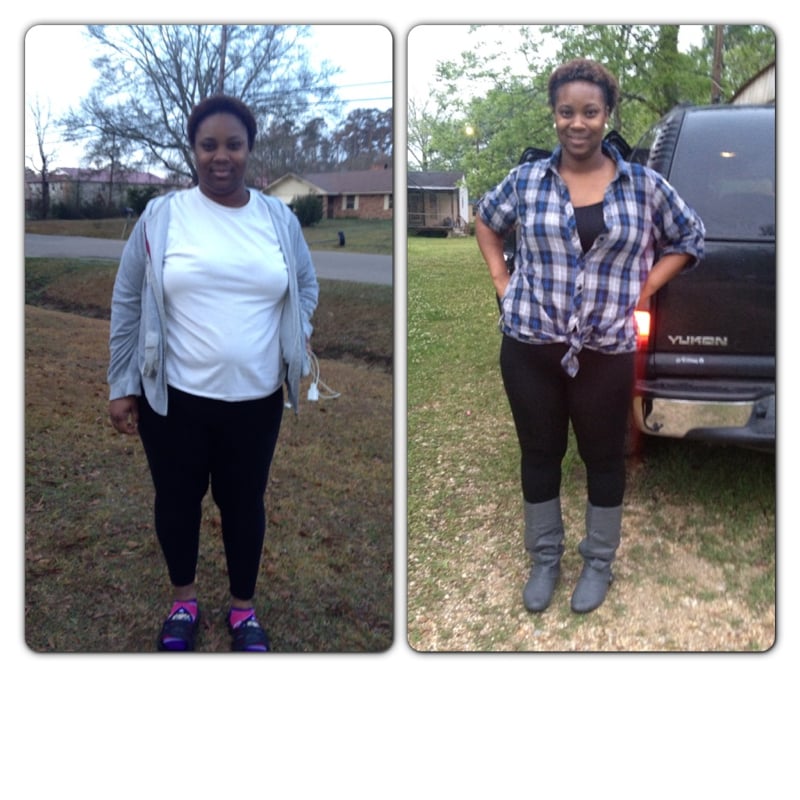
Damn !!!! Work it you look like I candy and honey I'm married you go girl amazing1/21/13 lost 75 pounds in total and 65 pounds post op almost to goal 25 pounds to go
 Yes!! BeautifulSurgery 1/21/13 5'7 and a half starting weight 299 CW 227 63 pound lost post opI'm at a 63 pound Lose post op and 73 all together my surgery was 1/21/13 I'm very happy w resultsI'm 71 total and 61 post op 1/21/13Thank u ladiesFor those who don't kno me I had surgery 1/21/13 I started at 299 the day of surgery I was 290 my current weight is 232 I've lost 58 pounds post op I feel so good and for the newbies I don't regret any thing this is the best thing in the beginning it's hard u can't eat really but once you start feeling full you will be satisfied w what u can it shopping is so fun now I brought me a new skirt and jacket to Celebrate
 Lost 3 pounds this weekLost 3 pounds this week1/21/13 down 68 pounds total 10 of the pounds pre opI also lost 10 pre op I meant to sayWe are like sleeve twin sister ..congratsDown 68 pounds total 10 of the pounds was post op 1/21/13 I lost 3 pounds this week yayDone 68 pounds total 1/21/13
 Dr Orydone did mine w the help of Dr Dominguez at St Tammany down a total 68 pounds 11 weeksGirl you look damn good let me just say that ..congrats5'7 and a half HW : 299 CW: 234 1/21/13 surgery date1/21/13 5'7and a half HW : 299 CW: 234







Account
Navigation
Search
Configure browser push notifications
Chrome (Android)
- Tap the lock icon next to the address bar.
- Tap Permissions → Notifications.
- Adjust your preference.
Chrome (Desktop)
- Click the padlock icon in the address bar.
- Select Site settings.
- Find Notifications and adjust your preference.
Safari (iOS 16.4+)
- Ensure the site is installed via Add to Home Screen.
- Open Settings App → Notifications.
- Find your app name and adjust your preference.
Safari (macOS)
- Go to Safari → Preferences.
- Click the Websites tab.
- Select Notifications in the sidebar.
- Find this website and adjust your preference.
Edge (Android)
- Tap the lock icon next to the address bar.
- Tap Permissions.
- Find Notifications and adjust your preference.
Edge (Desktop)
- Click the padlock icon in the address bar.
- Click Permissions for this site.
- Find Notifications and adjust your preference.
Firefox (Android)
- Go to Settings → Site permissions.
- Tap Notifications.
- Find this site in the list and adjust your preference.
Firefox (Desktop)
- Open Firefox Settings.
- Search for Notifications.
- Find this site in the list and adjust your preference.