Skip to content
View in the app

A better way to browse. Learn more.

BariatricPal

A full-screen app on your home screen with push notifications, badges and more.

To install this app on iOS and iPadOS
  1. Tap the Share icon in Safari
  2. Scroll the menu and tap Add to Home Screen.
  3. Tap Add in the top-right corner.
To install this app on Android
  1. Tap the 3-dot menu (⋮) in the top-right corner of the browser.
  2. Tap Add to Home screen or Install app.
  3. Confirm by tapping Install.

3 months

Down at total of 85. Almost fifty since day of surgery. I'm amazed what a difference there is from this time last year. The black dress was exactly a year ago and the teal one is from the end of April. IMG_0985.JPGIMG_0986.JPG
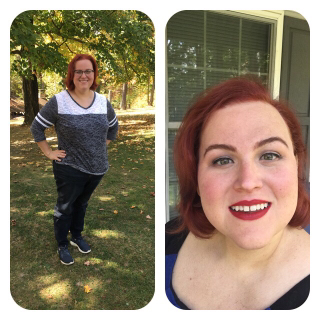
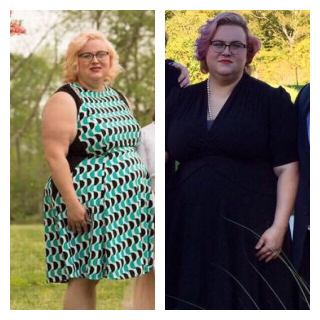
HW-292 • SW (6/29/17) 256.6 • CW 207.4

  • Replies 5
  • Views 1.2k
  • Created
  • Last Reply

Featured Replies

you look wonderful! congrats on your success!

Sent from my SM-S907VL using BariatricPal mobile app

  • Author
you look wonderful! congrats on your success!

Sent from my SM-S907VL using BariatricPal mobile app


Thank you! I feel great.


HW-292 • SW (6/29/17) 256.6 • CW 207.4
  • 2 weeks later...
  • Author
Any tips you've done great I still have my last doctor appt next week then waiting on my date

Sent from my N9560 using BariatricPal mobile app


I've just been very vigilant about following the guidelines my nutritionist set for me. When I've had something off plan it's only been a bite or two and it still always falls in my day's carb and calorie goals. I've been able to get my minimum protein and water goals since day three. I didn't take up exercising until two months post op when I was cleared for swimming.


HW-292 • SW (6/29/17) 256.6 • CW 202.0

Wow! You are so beautiful! Lose the glasses and reward yourself with contacts!!!

Archived

This topic is now archived and is closed to further replies.

Trending Products

PatchAid Vitamin Patches

Account

Navigation

Search

Search

Configure browser push notifications

Chrome (Android)
  1. Tap the lock icon next to the address bar.
  2. Tap Permissions → Notifications.
  3. Adjust your preference.
Chrome (Desktop)
  1. Click the padlock icon in the address bar.
  2. Select Site settings.
  3. Find Notifications and adjust your preference.