Skip to content
View in the app

A better way to browse. Learn more.

BariatricPal

A full-screen app on your home screen with push notifications, badges and more.

To install this app on iOS and iPadOS
  1. Tap the Share icon in Safari
  2. Scroll the menu and tap Add to Home Screen.
  3. Tap Add in the top-right corner.
To install this app on Android
  1. Tap the 3-dot menu (⋮) in the top-right corner of the browser.
  2. Tap Add to Home screen or Install app.
  3. Confirm by tapping Install.

Cigna needs more info[emoji35]

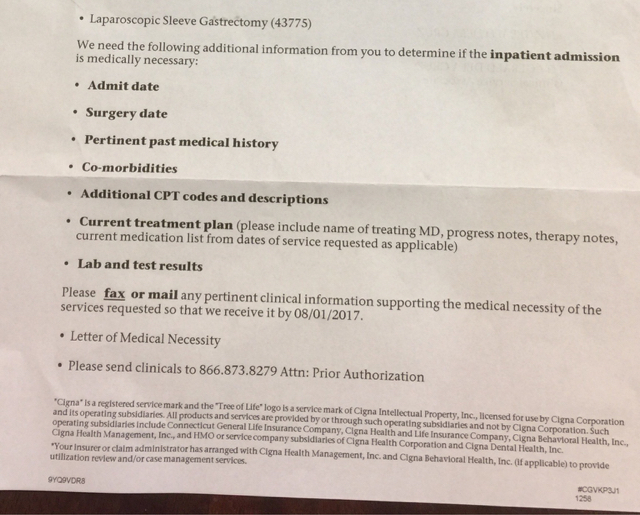
So my doctors office sent in all my required paperwork for my surgery authorization. Cigna sent a letter to them and me stating they need more info. The info they need is everything they already sent in. It also looks like they only need info to approve an overnight stay in the hospital. Anyone else get this? Is my surgery approved? IMG_0598.JPG

  • Replies 3
  • Views 1.4k
  • Created
  • Last Reply

Featured Replies

I just got the same letter myself (also insured by Cigna), even though I'd spoken to a rep on the phone at Cigna who told me I was approved already. I'm guessing it's a form letter that we don't need to do anything about, since the surgeon's office is responsible for submitting that data to the insurance company. I'm just checking with my surgeon to make sure all the I's are dotted and the T's are crossed.

I have Cigna and my letter did not say anything but approved for such and such day. You should call Cigna and get info on your own. It might be approved already. Who knows, maybe someone sent the wrong letter by accident? Could happen.

  • 2 weeks later...

I also have Cigna and I work in the Bahamas so I have to travel to Florida for my appointments and surgery. How long after the 4th required appointment did you all receive your surgery approval letter? My doctor's office originally told me 2 weeks, but they said Cigna is moving a bit slower these days.

Archived

This topic is now archived and is closed to further replies.

Trending Products

PatchAid Vitamin Patches

Account

Navigation

Search

Search

Configure browser push notifications

Chrome (Android)
  1. Tap the lock icon next to the address bar.
  2. Tap Permissions → Notifications.
  3. Adjust your preference.
Chrome (Desktop)
  1. Click the padlock icon in the address bar.
  2. Select Site settings.
  3. Find Notifications and adjust your preference.