




I made soup!
- Replies 5
- Views 437
- Created
- Last Reply
Top Posters In This Topic
-
breakinout 2 posts
-
Crafty Li'l Devil 2 posts
-
WGH3IWDT 1 post



Popular Days
Most Popular Posts
-
Looks soo good. Will be trying soon...bet that!! Sent from my SM-J700T1 using the BariatricPal App
-
It Looks Really Good, Enjoy A Little For Me, LOL Sent from my SAMSUNG-SM-N920A using the BariatricPal App
Posted Images
Featured Replies
Join the conversation
You can post as a guest; create a free account to track replies, follow topics, and be part of the largest weight loss surgery community.
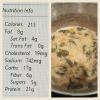
Not having this for dinner, will probably just have more tuna, but I made a Soup today since it's supposed to get cold here for the next few days. It has onion, garlic, celery, carrot, garlic, spinach, beef stock, chicken stock, white pepper, butter, lemon and I added 4 scoops of Protein powder to make it feel a little creamy. I can add chicken to it and I'll probably add some hot sauce to give it a little kick but there's about 8 servings here maybe more. You can see the nutritional info for each serving here without the hot sauce or chicken. Not bad if I do say so myself.
Sent from my SM-G920P using the BariatricPal App