Skip to content
View in the app

A better way to browse. Learn more.

BariatricPal

A full-screen app on your home screen with push notifications, badges and more.

To install this app on iOS and iPadOS
  1. Tap the Share icon in Safari
  2. Scroll the menu and tap Add to Home Screen.
  3. Tap Add in the top-right corner.
To install this app on Android
  1. Tap the 3-dot menu (⋮) in the top-right corner of the browser.
  2. Tap Add to Home screen or Install app.
  3. Confirm by tapping Install.
  • Appearance

Join BariatricPal free

  • Ask your own questions
  • Reply and follow topics
  • Message other members
  • No cost, no spam

Beware my fitness pal app update

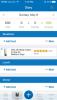
Hi all. I just updated my fitness pal and now there are banner ads in the middle of the diary (at least for me). I don't mind the ads as the ap is free and awesome but the ads it is showing me are for uber food delivery and a few others for shopping. Both things I am trying to avoid. Haha. Now that I have downloaded for iPhone and have the ads I will tool around the ap and see if there are any new cool features. I really need to read the what's new before downloading. Though I doubt it said "we are adding banner ads"

Have a great day

post-286600-14625871936894_thumb.jpg

Sent from my iPhone using the BariatricPal App

  • Replies 2
  • Views 1.1k
  • Created
  • Last Reply

Top Posters In This Topic

Most Popular Posts

  • You can always pay for their yearly program and avoid the ads. Not sure it's worth the large investment they ask though?

Posted Images
Featured Replies

You can always pay for their yearly program and avoid the ads. Not sure it's worth the large investment they ask though?

  • 4 weeks later...

I was so disappointed when I saw those at inserts. Most of them were unrelated, baiting, and some of them were even advertising junk food! I know the app is free, but there are better ways!

Join the conversation

You can post as a guest; create a free account to track replies, follow topics, and be part of the largest weight loss surgery community.

Join the conversation

You can post now and register later. If you have an account, sign in now to post with your account.

Guest
Reply to this topic...

Account

Navigation

Search

Search

Configure browser push notifications

Chrome (Android)
  1. Tap the lock icon next to the address bar.
  2. Tap Permissions → Notifications.
  3. Adjust your preference.
Chrome (Desktop)
  1. Click the padlock icon in the address bar.
  2. Select Site settings.
  3. Find Notifications and adjust your preference.