




Skip to content
View in the app

A better way to browse. Learn more.

BariatricPal

A full-screen app on your home screen with push notifications, badges and more.

To install this app on iOS and iPadOS
  1. Tap the Share icon in Safari
  2. Scroll the menu and tap Add to Home Screen.
  3. Tap Add in the top-right corner.
To install this app on Android
  1. Tap the 3-dot menu (⋮) in the top-right corner of the browser.
  2. Tap Add to Home screen or Install app.
  3. Confirm by tapping Install.

Port movement

Hi guys. First time posting. Ive had my lapband in for 3 weeks. Im doing really well but im worrying myself sick about the position of my port. Its moved about 5 inches to the left of where it was at the beginning. Below is a pic of me on my side.post-286579-14569948088084_thumb.jpg
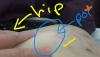
Sent from my SM-G920I using the BariatricPal App

  • Replies 1
  • Views 788
  • Created
  • Last Reply

Featured Replies

@@cherie122 I would give your surgeon's office a call and let them know of your concerns. Find out how they put the port in and if it is sewn to the muscle or not.

Often times during surgery the abdominal cavity is filled with gas to move organs up and away while the band and tubing is placed. As the gas dissipates and the abdominal cavity returns to normal it may feel as though things have moved when they really have just settled back into place. Also as you begin to lose the fat around your abdominal area things will shift, so keep in contact with your Dr.'s office and have them continue to monitor where things are, and how things are going for you. It's not uncommon for ports to have some minor issues like flipping on the side etc but it is defiantly worth the call and a visit if necessary to the Dr.

Let us know what they say and congrats on being banded!!

Archived

This topic is now archived and is closed to further replies.

Trending Products

PatchAid Vitamin Patches

Account

Navigation

Search

Search

Configure browser push notifications

Chrome (Android)
  1. Tap the lock icon next to the address bar.
  2. Tap Permissions → Notifications.
  3. Adjust your preference.
Chrome (Desktop)
  1. Click the padlock icon in the address bar.
  2. Select Site settings.
  3. Find Notifications and adjust your preference.
