




Skip to content
View in the app

A better way to browse. Learn more.

BariatricPal

A full-screen app on your home screen with push notifications, badges and more.

To install this app on iOS and iPadOS
  1. Tap the Share icon in Safari
  2. Scroll the menu and tap Add to Home Screen.
  3. Tap Add in the top-right corner.
To install this app on Android
  1. Tap the 3-dot menu (⋮) in the top-right corner of the browser.
  2. Tap Add to Home screen or Install app.
  3. Confirm by tapping Install.

Port movement

Hi guys. First time posting. Ive had my lapband in for 3 weeks. Im doing really well but im worrying myself sick about the position of my port. Its moved about 5 inches to the left of where it was at the beginning. Below is a pic of me on my side.post-286579-14569948088084_thumb.jpg
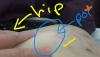
Sent from my SM-G920I using the BariatricPal App

  • Replies 1
  • Views 869
  • Created
  • Last Reply

Featured Replies

A picture won't mean anything.

Call your surgery practice and ask about the port. Let someone take a look. It may be that it came undone from its mooring, in which case it will need to be repositioned. Another possibility is that you're merely noticing that it seems to be in different places when you are in different positions. Again, go in to be checked for your peace of mind instead of feeling terrorized at home.

Archived

This topic is now archived and is closed to further replies.

Trending Products

PatchAid Vitamin Patches

Account

Navigation

Search

Search

Configure browser push notifications

Chrome (Android)
  1. Tap the lock icon next to the address bar.
  2. Tap Permissions → Notifications.
  3. Adjust your preference.
Chrome (Desktop)
  1. Click the padlock icon in the address bar.
  2. Select Site settings.
  3. Find Notifications and adjust your preference.
