Skip to content
View in the app

A better way to browse. Learn more.

BariatricPal

A full-screen app on your home screen with push notifications, badges and more.

To install this app on iOS and iPadOS
  1. Tap the Share icon in Safari
  2. Scroll the menu and tap Add to Home Screen.
  3. Tap Add in the top-right corner.
To install this app on Android
  1. Tap the 3-dot menu (⋮) in the top-right corner of the browser.
  2. Tap Add to Home screen or Install app.
  3. Confirm by tapping Install.

How can I delete photos from a post?

  • Replies 6
  • Views 1.1k
  • Created
  • Last Reply

Featured Replies

Testing delete...

post-261961-14549427984326_thumb.jpg

Edited by DaisyAmy

Boy, I don't know. I posted the pic above and then tried to see if I could delete it, but I don't see a way (I use the app).

Hopefully someone smarter than I am will come along and help you out!!

I was just able to add a photo, and then delete it.

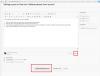
1. Click the "edit" button on the post you want to remove the pictures.

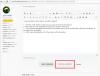
2. Now click the "Use Full Editor" button at the bottom of the post.

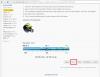
3. The uploaded image/file should show underneath your post in the full editor, click the red "delete" to the right of the picture/file.

4. Click "submit modified post" at the bottom of the full editor.

post-256777-0-71630900-1454947383_thumb.jpg

post-256777-0-70055100-1454947393_thumb.jpg

post-256777-0-31157800-1454947397_thumb.jpg

Ahh, looks like you need to be on the full site to do that. I just knew someone smarter would come along ????

Archived

This topic is now archived and is closed to further replies.

Trending Products

PatchAid Vitamin Patches

Account

Navigation

Search

Search

Configure browser push notifications

Chrome (Android)
  1. Tap the lock icon next to the address bar.
  2. Tap Permissions → Notifications.
  3. Adjust your preference.
Chrome (Desktop)
  1. Click the padlock icon in the address bar.
  2. Select Site settings.
  3. Find Notifications and adjust your preference.