




Before/After
- Replies 4
- Views 981
- Created
- Last Reply
Top Posters In This Topic
-
Margie122 1 post
-
JamieLogical 1 post
-
VDLT 1 post
-
Jessica _ Stephens 1 post




Popular Days
Most Popular Posts
-
Still a long way to go! Sleeved on 12/14/15 HW: 296 SW: 285 CW: 256
Posted Images

Featured Replies
Join the conversation
You can post as a guest; create a free account to track replies, follow topics, and be part of the largest weight loss surgery community.
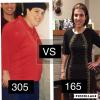
I remember the days when I had to run out and buy a new outfit for an event because nothing in my closet fit. I would end up with something that I not only hated, but paid a lot of money. I felt so uncomfortable in my own skin.
Last night I had a dinner and needed to buy stockings. I walked into the store and spotted a dress. My closet and wallet know that I didn't need a new dress. The dress was Perfect for the dinner. How could I refuse the $29 price tag? I couldn't ????!
HW:305
SW: 263
CW: 165
Here is a before and after.