




New NSV and Best friend- future workout partner
- Replies 6
- Views 617
- Created
- Last Reply
Top Posters In This Topic
-
Elode 3 posts
-
glitter eyes 1 post
-
butterfly23 1 post
-
VDLT 1 post




Popular Days
Most Popular Posts
-
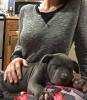
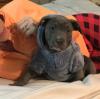
Omg! Love your puppy! So sweet. Congrats on the new buddy.
-
Great NSV and adorable puppy...have you picked a name yet?
-
What an adorable puppy!!
Posted Images


Featured Replies
Join the conversation
You can post as a guest; create a free account to track replies, follow topics, and be part of the largest weight loss surgery community.
Hi all! I was at one of our clinic today where we have a new employee. One of the nurses there has decided to have WLS since seeing my success. We were talking about it since her surgery is next Tuesday and the new girl started asking me about mine. I told her I was 267 last year and now I'm 145. She says "wow I didn't not think you weighed that!" I was stuffing a rollo in my mouth at the time and started to spit it out. I said oh, what I look like I weigh more huh? She says no way! You look so small! I never would have guessed you were ever big! That made my day!! Next, I got this new guy in my life! He's my future jogging partner once the weather warms up. I'm gonna do it this time. I'm kind of in love! Hope everyone is doing well