Skip to content
View in the app

A better way to browse. Learn more.

BariatricPal

A full-screen app on your home screen with push notifications, badges and more.

To install this app on iOS and iPadOS
  1. Tap the Share icon in Safari
  2. Scroll the menu and tap Add to Home Screen.
  3. Tap Add in the top-right corner.
To install this app on Android
  1. Tap the 3-dot menu (⋮) in the top-right corner of the browser.
  2. Tap Add to Home screen or Install app.
  3. Confirm by tapping Install.

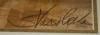
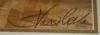
Help me figure out this name

Long story short, I need to figure out what this name is. First name? Last name? Combination? No idea! Please post your guesses.

post-205294-13813135098461_thumb.jpg

post-205294-1381313509858_thumb.jpg

  • Replies 9
  • Views 953
  • Created
  • Last Reply

Top Posters In This Topic

Posted Images

Featured Replies

  • Author

Ooh, you're quick - and right!

I have one print and was hoping to identify the artist so I could see if there were any others of the same subject

I kept seeing "Svasso Ceilia" or "S. Vassodelia" :rolleyes

Similar Question:

I inherented a painting by an artist who name as it appears in the lower left hand corner as:

D. Bles

any ideas? I would like to learn about the artist and painting but many hours of googling and I still have zilch!

if I can talk my litle sister into taking a picture I will put them up here ASAP

Derick,

Could your painting be by David Joseph Bles? He was a Dutch painter and printmaker (1821-1899) known for his satirical genre scenes and portraits with sassy double meanings. What is your painting of? I found the info on grove art online.

It seems (to me) to be a paining of a village close by the sea, there are people shown on the painting but they have no faces.

I am not certain but I think it is a oil painting done on canvas (of some sort)

Join the conversation

You can post now and register later. If you have an account, sign in now to post with your account.

Guest
Reply to this topic...

Trending Products

PatchAid Vitamin Patches

Account

Navigation

Search

Search

Configure browser push notifications

Chrome (Android)
  1. Tap the lock icon next to the address bar.
  2. Tap Permissions → Notifications.
  3. Adjust your preference.
Chrome (Desktop)
  1. Click the padlock icon in the address bar.
  2. Select Site settings.
  3. Find Notifications and adjust your preference.