Skip to content
View in the app

A better way to browse. Learn more.

BariatricPal

A full-screen app on your home screen with push notifications, badges and more.

To install this app on iOS and iPadOS
  1. Tap the Share icon in Safari
  2. Scroll the menu and tap Add to Home Screen.
  3. Tap Add in the top-right corner.
To install this app on Android
  1. Tap the 3-dot menu (⋮) in the top-right corner of the browser.
  2. Tap Add to Home screen or Install app.
  3. Confirm by tapping Install.

Yum!

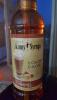
I found this yummy no sugar no calorie flavoring for my sugar free hot chocolate! I also added it to iced coffee! I love that I can make my own speciality drinks without having to worry about dumping because of the sugar content or ordering something sugar free and it's really regular. I'm a happy girl.

post-234134-14307055773619_thumb.jpg

  • Replies 5
  • Views 776
  • Created
  • Last Reply

Featured Replies

  • Author

Where did u find this?

I love caramel!

Hi! I found this on Amazon. LOVE it! I had some last night in hot chocolate. There are several flavors too :)

Here's what I prefer ... they're all natural flavored liquid Stevia! Zero everything. It only takes a few drops and the taste is amazing. I keep one in my purse and when I go to Starbucks so I can flavor my own coffee or Protein shake/coffee mixture. pumpkin Spice and English Toffee are my favorites.

droppersAll.jpg

Archived

This topic is now archived and is closed to further replies.

Trending Products

PatchAid Vitamin Patches

Account

Navigation

Search

Search

Configure browser push notifications

Chrome (Android)
  1. Tap the lock icon next to the address bar.
  2. Tap Permissions → Notifications.
  3. Adjust your preference.
Chrome (Desktop)
  1. Click the padlock icon in the address bar.
  2. Select Site settings.
  3. Find Notifications and adjust your preference.