




Notifications not displaying
- Replies 4
- Views 850
- Created
- Last Reply
Top Posters In This Topic
-
ProudGrammy 1 post
-
bobbyswife 1 post
-
Elode 1 post
-
SuperDave 1 post




Popular Days
Most Popular Posts
-
This is an issue that @@Alex Brecher and his team are actively working on
-
That does happen at times. When it does, you can right click on the notification icon and select "open in new tab" or something similar, depending on your browser. No worries!
-
@@Bufflehead nowwwww i understand there was a check worth $10,000.00 sent to me it was supposed to be sent to you i "notified" you i explained the check was only good until yesterday so i
Posted Images
Featured Replies
Join the conversation
You can post as a guest; create a free account to track replies, follow topics, and be part of the largest weight loss surgery community.
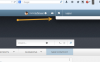
When I have notifications, I click on the notification badge (in the upper right corner, it displays as a number showing how many notifications I have), I get nothing. Well, I get a little empty blank white space, see the screen capture below with the arrow pointing to where the notifications would usually be.
I have tried viewing notifications on two different computers (Windows Home 7 premium and Windows 7 pro) using both Firefox and Chrome and get the same results each time.
My messages and everything else work just fine.