




Before/almost Done!
- Replies 32
- Views 4.4k
- Created
- Last Reply
Top Posters In This Topic
-
amytug 5 posts
-
Evolving 2 posts
-
DonRodolfo 2 posts
-
sarsar 1 post



Most Popular Posts
-
Wow. What a great job you've done!!! Congrats and best wishes on those last few lbs. Your story and pics will inspire othersi am sure. Seeing them helps keep me inspired.
-
Great job, you look beautiful and happy! Your eyes in your before pic look sad, you eyes are glowing and happy now! When you first joined where you the one with the banana phone in your profile pic?
-
Amazing, Sweet Amytug!


Posted Images



Featured Replies
Join the conversation
You can post as a guest; create a free account to track replies, follow topics, and be part of the largest weight loss surgery community.
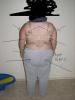
I finally feel like I can do a before and "after"!! I am 9 months post op and love my sleeve!! I finally love my life! No more staying in for me! No more putting off laundry because it's "all the way downstairs". I'm living life, smiling all the time, enjoying the heck out of it all!!! Side by side- the best I could do for now. ****** try to avoid my horrible "bra is 4 sizes too big" deal I have going on. It's gonna be remedied soon. Hehe When I was a newbie (feels like yesterday) I adored before and afters. I want I be an inspiration. If anyone has questions don't hesitate to ask bid love to help! 240/127 size 22/6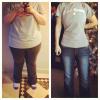 Before= miserable
  Before face
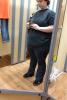
 And here's me in the bathroom at Walmart. The reason for this pic is that I used to cringe and damn-near cry when I see the mirrors at Walmart. Every time. I HATED mirrors. Now!? I get giddy to walk by one and look at and pinch myself!! I'm 126.8 today. My ultimate goal is to get to 116-120.