




charting weight & Stalls for Pre & Post ops
- Replies 2
- Views 714
- Created
- Last Reply


Popular Days
Posted Images
Featured Replies
Join the conversation
You can post as a guest; create a free account to track replies, follow topics, and be part of the largest weight loss surgery community.
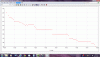
So, I charted my weight.....yes I weigh myself everyday....have done it for years.......up or down, doesn't freak me out......but I wanted to share the graph so any newbies and preops or anyone in the same place as me can see that can have hiccups along the way, and when that happens, if we stay the course, we will get through them....at 3 months out, I still feel like a newbie finding my way.
it was interesting to see the stalls...........I dipped to 199, and the next day I shot right back up to 200 the following day, and stayed there for 13 days....in three months, I've had 3 plateaus (hiccups) along the way......and that's okay....it's going to happen to most of us.
I'm 1/2 way to goal.......and that surprises the heck out of me........sometimes it doesn't feel real.....I tried on my "fat pants" and couldn't believe how big they were---doesn't seem possible................well, anyway, for what it's worth, here's my process, stalls, gains, and overall down trend......