Skip to content
View in the app

A better way to browse. Learn more.

BariatricPal

A full-screen app on your home screen with push notifications, badges and more.

To install this app on iOS and iPadOS
  1. Tap the Share icon in Safari
  2. Scroll the menu and tap Add to Home Screen.
  3. Tap Add in the top-right corner.
To install this app on Android
  1. Tap the 3-dot menu (⋮) in the top-right corner of the browser.
  2. Tap Add to Home screen or Install app.
  3. Confirm by tapping Install.

I'M NOT OVERWEIGHT!

Had the biggest NSV today... Finally I am in my healthy weight range!! My BMI is normal!!!!!!!!

I never thought I would see this day!! So happy :)

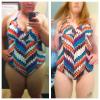
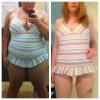
I also tried on some swimmers that I wore on holiday two years ago, here are the results:

There are about 44kgs between the before and after

post-39973-13813667549428_thumb.jpg

post-39973-13813667550393_thumb.jpg

  • Replies 13
  • Views 1.2k
  • Created
  • Last Reply

Featured Replies

Congratulations on all your success!!

Congrats! Quick question - what does NSV stand for?

  • Author
Congrats! Quick question - what does NSV stand for?

NSV- non scale victory

So any weight loss achievement that isn't the numbers going down on the scale

Non scale victory

Great! Thanks for explaining!

You have a space between your thighs!! I hope I have that when all is said and done!

Mind telling u how you did it!?

You look awesome!!

  • Author
You have a space between your thighs!! I hope I have that when all is said and done!

Mind telling u how you did it!?

I know I love the gap!!! At the moment that's with feel shoulder width apart. My aim is to have the gap when my feet are together!

My suggestion is to follow your doctors orders, I often skip breakfast which is really bad. I try to exercise everyday and I have a personal trainer 3 times a week.

You don't need a personal trainer but it really helps!

Archived

This topic is now archived and is closed to further replies.

Trending Products

PatchAid Vitamin Patches

Account

Navigation

Search

Search

Configure browser push notifications

Chrome (Android)
  1. Tap the lock icon next to the address bar.
  2. Tap Permissions → Notifications.
  3. Adjust your preference.
Chrome (Desktop)
  1. Click the padlock icon in the address bar.
  2. Select Site settings.
  3. Find Notifications and adjust your preference.