Skip to content
View in the app

A better way to browse. Learn more.

BariatricPal

A full-screen app on your home screen with push notifications, badges and more.

To install this app on iOS and iPadOS
  1. Tap the Share icon in Safari
  2. Scroll the menu and tap Add to Home Screen.
  3. Tap Add in the top-right corner.
To install this app on Android
  1. Tap the 3-dot menu (⋮) in the top-right corner of the browser.
  2. Tap Add to Home screen or Install app.
  3. Confirm by tapping Install.

topic previews

I have a forum suggestion

on some forums I'm a member of, you can see a preview of the threads first post under each topic title before opening a post. If that makes sense. I was hoping we can get something like that here.. some you hover over the title name and a preview box will pop up.. in others it's already there. OR maybe there is a setting I can change so that I can see this? THIS way we dont have to click on every thread to see if it is something we are interested in reading or not.

like a thread titled "uhoh" is pretty cryptic. I have to click it to know what it's about. If I had a preview, I'd be so happy.

thanks

  • Replies 1
  • Views 625
  • Created
  • Last Reply

Featured Replies

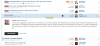
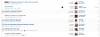
Great suggestion! I believe we have this feature available for quite some time now. You need to click the arrow to preview, instead of hovering. Please see these screenshots for an example:

Screen Shot 2013-05-01 at 10.20.36 PM.png

Screen Shot 2013-05-01 at 10.20.49 PM.png

Archived

This topic is now archived and is closed to further replies.

Trending Products

PatchAid Vitamin Patches

Account

Navigation

Search

Search

Configure browser push notifications

Chrome (Android)
  1. Tap the lock icon next to the address bar.
  2. Tap Permissions → Notifications.
  3. Adjust your preference.
Chrome (Desktop)
  1. Click the padlock icon in the address bar.
  2. Select Site settings.
  3. Find Notifications and adjust your preference.