-
Trending Products
-
Trending Topics
-

- 9,414 replies
- 781,191 views
-

- 552 replies
- 25,753 views
-
- 127 replies
- 5,105 views
-
-
Recent Status Updates
-

-
.thumb.jpg.c81b2b19dba7017ef910d3bb43da502a.jpg) Welcome to Frugal Testing, where we are committed to revolutionizing the software testing landscape with our efficient and affordable solutions. As a pioneering company in this field, we understand the challenges faced by startups, small to medium-sized businesses and any organization working without budget constraints. Our mission is to deliver top-notch testing services that ensure the highest quality of software, all while keeping your costs in check.· 0 replies
Welcome to Frugal Testing, where we are committed to revolutionizing the software testing landscape with our efficient and affordable solutions. As a pioneering company in this field, we understand the challenges faced by startups, small to medium-sized businesses and any organization working without budget constraints. Our mission is to deliver top-notch testing services that ensure the highest quality of software, all while keeping your costs in check.· 0 replies
Frugal Testing offers a comprehensive suite of testing services tailored to meet diverse needs. Specializing in different types of testing including functional testing, automation testing, metaverse testing and D365 testing, we cover all bases to guarantee thorough software quality assurance. Our approach is not just about identifying bugs; it's about ensuring a seamless and superior user experience.
Innovation is at the heart of what we do. By integrating the latest tools and technologies, many of which are cutting-edge open source solutions, we stay ahead in delivering efficient and effective testing services. This approach allows us to provide exceptional quality testing without the high costs typically associated with advanced testing methodologies.
Understanding each client's unique needs is fundamental to our service delivery. At Frugal Testing, the focus is on creating customized testing strategies that align with specific business goals and budget requirements. This client-centric approach ensures that every testing solution is not only effective but also fully aligned with the client's objectives.
Our team is our greatest asset. Composed of skilled professionals who are experts in the latest testing techniques and technologies, they bring dedication, expertise and a commitment to excellence in every project. This expertise ensures that our client’s software not only meets but often exceeds the highest standards of quality and performance.
Frugal Testing is more than just a service provider; we are a partner in your success. With a blend of quality, innovation and cost-effectiveness, we are here to help you navigate the complexities of software testing, ensuring your product stands out in today's competitive market.
- This update has no replies.
-
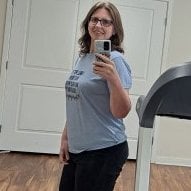
 I have no clue where to upload this, so I'll put it here. This is pre-op vs the morning of my 6 month appointment! In office I weight 232, that's 88 lbs down since my highest weight, 75 lbs since my surgery weight! I can't believe this jacket fit... I am smaller now than the last time I was this size which the surgeon found really amusing. He's happy with where I am in my weight loss and estimates I'll be around 200 lbs by my 1 year anniversary! My lowest weight as an adult is 195, so that's pretty damn exciting to think I'll be near that at a year. Everything from there will be unknown territory!!· 3 replies
-

-

-

So proud of you Cat. Getting into those smaller size clothes is half the fun isn't it?. Keep up the good work!!!!
-
-
 I changed my profile image to a molecule of protein. Why? Because I am certain that it saved my life.· 1 reply
-
That's brilliant! You've done amazing!! I should probably think about changing my profile picture at some point. Mine is the doll from Squid Games. Ironically the whole premise of the show is about dodging death. We've both done that...
-
-

-



Announcements
-
-
Recent Topics
-
-
Hot Products
-
-
Together, we have lost...lbs
-