Skip to content
View in the app

A better way to browse. Learn more.

BariatricPal

A full-screen app on your home screen with push notifications, badges and more.

To install this app on iOS and iPadOS
  1. Tap the Share icon in Safari
  2. Scroll the menu and tap Add to Home Screen.
  3. Tap Add in the top-right corner.
To install this app on Android
  1. Tap the 3-dot menu (⋮) in the top-right corner of the browser.
  2. Tap Add to Home screen or Install app.
  3. Confirm by tapping Install.

It's Official!

As of today I have lost...

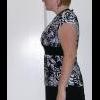
100 pounds!!

EEK! I am so excited :thumbup:

I have only 16 pounds to go until I am at goal, I have gone from a size 28 to a size 14/16, I am no longer hypertensive, do not have sleep apnea, blood sugars are fabulous and my hormone levels are looking better (I have severe PCOS and androgen disorder).

  • Replies 31
  • Views 3.4k
  • Created
  • Last Reply

Top Posters In This Topic

Featured Replies

  • Author

well, I got an ulcer... but besides that, no I havn't had complications.

I can pretty much eat normally now (I mean... a very small portion, but can eat what I Want). I have loose skin on my belly, arms and inner thighs BUT I think it will get better. It seems like my arms and tummy have started to bounce back a little. I have had a hard time with exercise lately... I usually just walk. But, it is dark when i get up in the morning and dark when i get home from work. I nanny, so I Dont get a break during the day to be able to go out and walk, so it has been a struggle. I got two jillian michael's videos, so I Am going to start doing those. Hopefully the change of pace will be a good thing, anyway :) I have been doing crunches on an exercise ball, which I love :)

Join the conversation

You can post now and register later. If you have an account, sign in now to post with your account.

Guest
Reply to this topic...

Trending Products

PatchAid Vitamin Patches

Account

Navigation

Search

Search

Configure browser push notifications

Chrome (Android)
  1. Tap the lock icon next to the address bar.
  2. Tap Permissions → Notifications.
  3. Adjust your preference.
Chrome (Desktop)
  1. Click the padlock icon in the address bar.
  2. Select Site settings.
  3. Find Notifications and adjust your preference.