nickynat
LAP-BAND Patients
-
Joined
-
Last visited
-
-
The new me
-
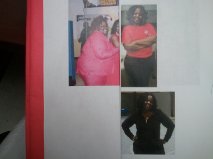
Hey 2010 June Bugs! Where are y'all? How's the lapband working for you? We just celebrated our 2 year anniversary I've lost over 130 lbs since being banded. I feel and look so much better! I hope there's still some 2010 Junebugs out there...
-
-
-
-
6 months post op pictures, a weight loss surgery photo album by nickynat on BariatricPal. 5 photos in Member Photo Gallery.
-
This are various pictures of me before surgery.
-
Yes it is at the Bariatric Institute.
-
Just want everyone to know the next support group meeting is Feb 12, 2011 at 10:00 am.
-
Hey ya'll I totally agree. This forum really needs to pick up "active" members. So here's what we'll do: Let's start posting tips and advice to the forum so others will know that the forum has active participants. Also, does anyone know when does the support group meets? I really wanna start going so I can meet other bandits and share info. I looking forward to getting to know ya'll, too !!! So let's keep up the postings and get this forum in motion !!!! XOXO Nicky