




Skip to content
View in the app

A better way to browse. Learn more.

BariatricPal

A full-screen app on your home screen with push notifications, badges and more.

To install this app on iOS and iPadOS
  1. Tap the Share icon in Safari
  2. Scroll the menu and tap Add to Home Screen.
  3. Tap Add in the top-right corner.
To install this app on Android
  1. Tap the 3-dot menu (⋮) in the top-right corner of the browser.
  2. Tap Add to Home screen or Install app.
  3. Confirm by tapping Install.
  • Appearance

Join BariatricPal free

  • Ask your own questions
  • Reply and follow topics
  • Message other members
  • No cost, no spam

BStar

Pre Op
  • Joined

  • Last visited

Everything posted by BStar

  1. Good luck, I pray everything goes well Sent from my SM-J727V using BariatricPal mobile app
  2. I feel so much better and if I get at least 50 more off I can get my knee replacement! Sent from my SM-J727V using BariatricPal mobile app
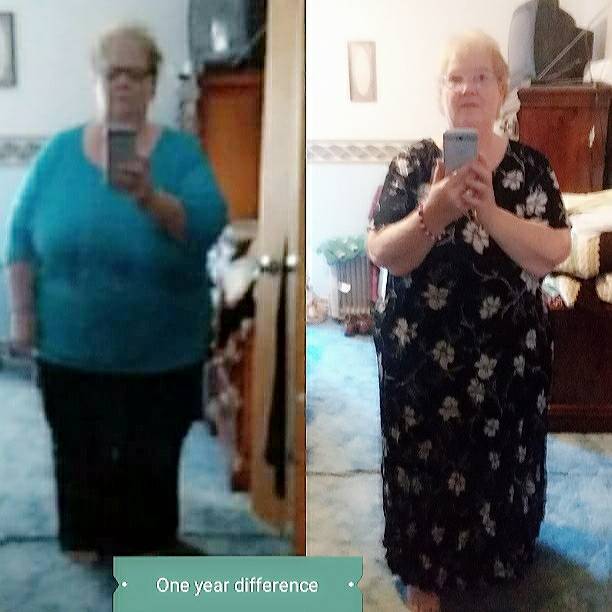
  3. My journey started 2002 with gastric bypass Roux n y with band. I went from 438 to 308 and then started gaining again 2 years later. For years I fought to lose with no results. I had developed a fistula in my pouch. Long story short, I had revision June 7, 2017 to repair the fistula and had to have half of remnant stomach removed. I have now lost from 385 to 298 and feeling great . Sent from my SM-J727V using BariatricPal mobile app
  4. Lost 80lb in one year. Had gastric bypass revision due to a fistula in my pouch. Surgery was June 7, 2017 Sent from my SM-J727V using BariatricPal mobile app
Account

Navigation

Search

Search

Configure browser push notifications

Chrome (Android)
  1. Tap the lock icon next to the address bar.
  2. Tap Permissions → Notifications.
  3. Adjust your preference.
Chrome (Desktop)
  1. Click the padlock icon in the address bar.
  2. Select Site settings.
  3. Find Notifications and adjust your preference.