JersSlimDown
Pre Op
-
Joined
-
Last visited
Everything posted by JersSlimDown
-
I am aiming for surgery during my 10 day spring break in March. If I get a surgery date closer to the beginning of my break will a week be enough time for me to recover? I have to return to campus after spring break is over. I will resume classes and work. My work isnt physically demanding whatsoever, I am a mentor to other college students. Will I be okay with a few days to recover? Im worried about the pain....I cant really afford to miss too many days of class as I will be graduating in May.
-
Well the only thing that sucks is when youre bigger, it takes for a bit more weight to come off for people to really notoce. I had to lose about 60 pounds and post it on social media for people to notice. And sometimes I feel like the only reason some people actually noticed was because I broadcasted it on social media. But not really because people I hadnt saw in months and didnt have on social media were complimenting me asking if I lost any weight. Give it another 10-20 pounds, Im sure others will start pointing it out!! Congratulations on your weightloss ????
-
I am just beginning my journey as well. I had my first consukt on January 10th. My requirements are that I have to lose 10% of my body weight which is 28 pounds, I have to have biweekly weigh ins to know I am losing weight. I have to have a PAP smear done, chest xray and gallbladder ultrasound, I also have to stop smoking 6 weeks prior to surgery (I dont smoke cigarettes, just weed), Ive already had all of my blood work done and the EKG. And lastly the psych evulation I have to doa. Luckily I dont have to do a 3 month or 6 month supervised diet. I can have a surgery date depending on how fast I get all the things checked off my list. So Im shooting for March, Im just worried I wont be able to do march because it will cost me about $6000 that I dont have, but they said if I can come up with half they can work with me....so depending on my finances I may have to wait until May unfortunately. I wish you the best of luck on your journey!!
-
My grandmother has been the most supportive. I havent told many people
-
When I couldnt fit on a ride at an amusement park, when I couldnt walk 1 mile without feeling like I was going to pass out. Thats when I was 332 pounds but I am now 289, but not because of surgery, I did that on my own. I knew it was time to change. I am ready for surgery now!!
-
I am a fulltime college student, living on campus. Im currently on winter break. I have my very first consultation on Jan 10th. I was wondering if there are others here that have gone through with the gastric sleeve surgery & how the pre-op stage & post op went while in college?
-
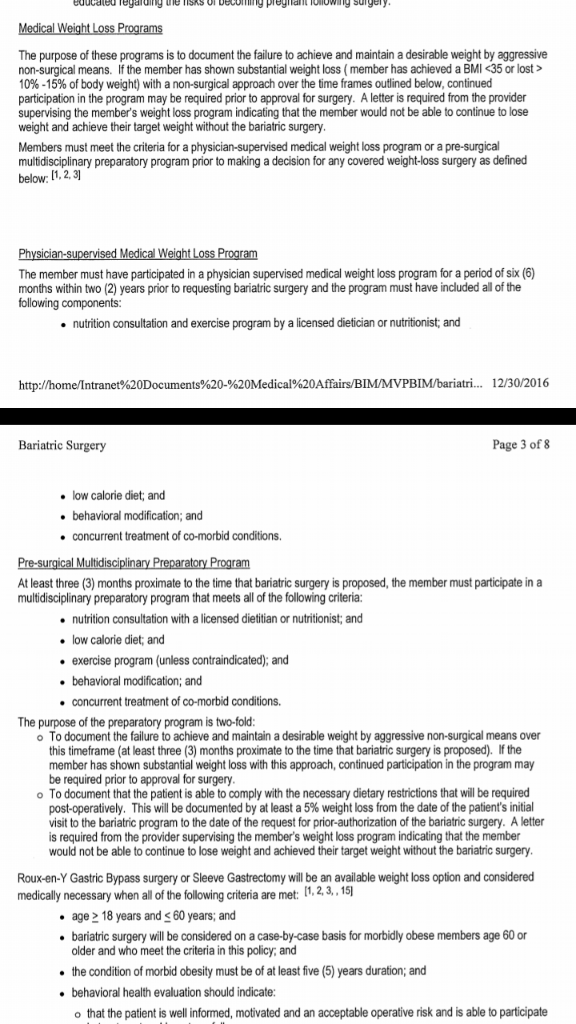
My insurance company sent me the weight loss policy. I was reading through it and it stated that I must complete 6 months of a physicians supervised diet and a 3 month pre-surgical multidisciplinary preparatory program as well? Im confused, what is the difference between the two, they require exactly the same things except 1 is 6 months and the other is 3 months? Will I have to complete both of these programs? I included a screenshot of the policy.
-
How do I know if I've met my max out of pocket?? Im sorry if thats a dumb question, I just dont know much about insurance. Im in college and on my fathers insurance and only thing I ever have to pay is copays for doctor visits. & thank you for telling me that, Ive been reading others post about setting up a payment plan with the hospital if needed. I would much rather have a payment plan than taking out a loan.
-
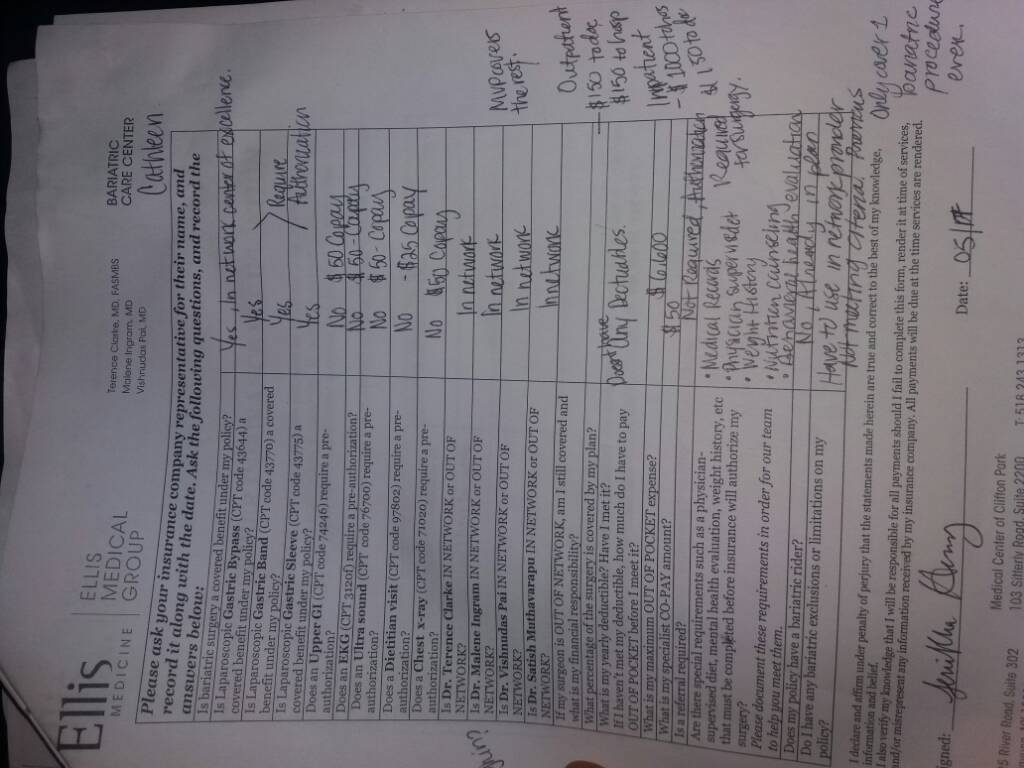
Hi all, I am in the very beginning stages of this journey. I had began researching over a year ago, started and stored but I finally settled on making this decision become reality. But I am a bit confused, I was worried about how much Ill have to pay for insurance. My insurance doesnt come with any deductibles but all of my future visits will require a $50 copay which is fine. My insurance said they will cover to pay the hospital 1,000 and the surgeon $150. But where I get worried is that my max out of pocket is 6,600. So my question is, does that mean I'll be paying $6,600 for surgery??? Im so confused about this. I attached the paper I filled out with a representative.