mabennett91
Pre Op
-
Joined
-
Last visited
-
-
-
-
-
-
-
-
-
-
-
Sleeved 9.15 down 90lbs and couldn't be happier

-
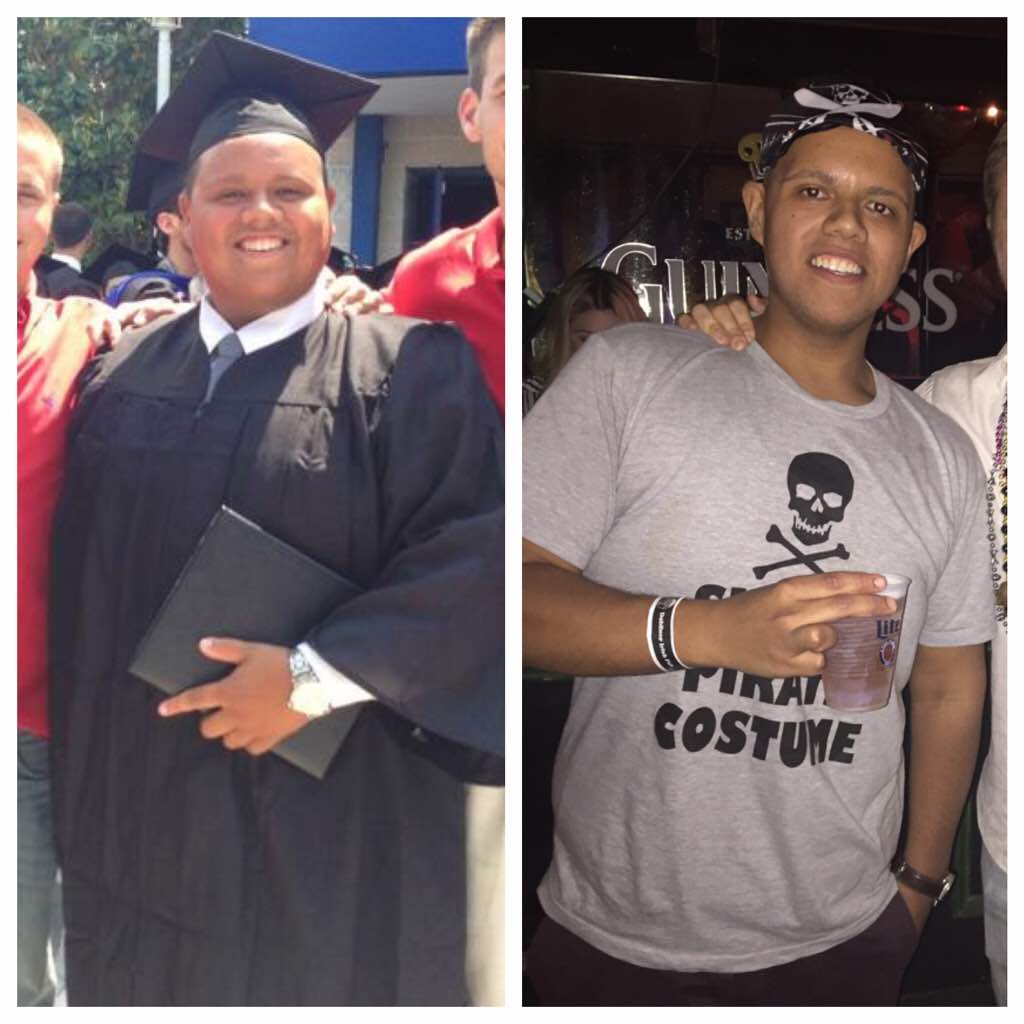
Before After The first picture is at my highest weight (350). The second is today (238). I am two months post op and started my surgery at 286. Lost some weight pre consultation and was at 310 in January when I started my sleeve process. This has been the best thing I have done and I do not regret any of it. Hoping to get down to 185.


-
I felt the same way when I began my process. I am 24 and had surgery on 9/14, I started the process in January and it was a long path to surgery but I can tell you it's 100 percent worth it. I am 3 weeks out and down 20pounds since they day of surgery. I know right now it seems like a lot to take in but if you take it step by step it will be worth it. Feel free to ask me any questions/advice.Was you in a lot on pain after Sent from my HTC Desire 626s using Tapatalk Surprisingly no, I was sore where the stitches were and slightly uncomfortable but nothing as bad as I thought I would be. Also was able to walk right away.
-
I felt the same way when I began my process. I am 24 and had surgery on 9/14, I started the process in January and it was a long path to surgery but I can tell you it's 100 percent worth it. I am 3 weeks out and down 20pounds since they day of surgery. I know right now it seems like a lot to take in but if you take it step by step it will be worth it. Feel free to ask me any questions/advice.
-
From manhattan(UES) and just had surgery 9/14. Started my journey at 310 (first appointment) and was 286 when I started my pre op diet. I went into surgery at 273 and today being a little over 3 weeks I am at 256 and never felt better. I have a feeling I am at the 3 week stall because I haven't lost anything this week unfortunately.
-
Hello, I had my surgery(vsg) on 9/14 I felt a little gas pain for about four days after surgery, after that I felt completely fine. Some soreness where the incisions are but other than that I feel great. Going into surgery I was very nervous especially after heparin some of the horror stories on here but don't worry you will be fine. Good luck!!
-
Bh



-
Was sleeved on the 14th and everything went a lot smoother than I had anticipated (not bragging). It is now Friday and I have been able to tolerate everything. I'm a little concerned that I should be feeling more restriction? Fluids have even been going down a lot easier today than the last couple(can take close to normal sips) does this mean something is wrong?
-
Wow so close I'm sept 21 I'm nervous yet excited but this liquid diet sucks balls Sent from my SM-G900T using Tapatalk Yea liquid diet sucks, my doctor allows one small meal and two shakes so it's manageable. Thought I would be more nervous at this point but I'm just ready to get it done.
-
24 and having surgery on Monday! Cannot wait, good luck with your journey!
-
Getting sleeved in Manhattan on September 14th, coming quick but it still hasn't hit me.
-
Anyone getting sleeved in September or around then in NYC? Was just approved for surgery for September 14th!
-
Thanks, same to you!
-
I am having the sleeve.
-
Was just approved for September 14th, I have health first so I had to do 6 months. I did not have the five year weight history so my doctor just put that I have been overweight for over 10 years, hope this helps!