Skip to content
View in the app

A better way to browse. Learn more.

BariatricPal

A full-screen app on your home screen with push notifications, badges and more.

To install this app on iOS and iPadOS
  1. Tap the Share icon in Safari
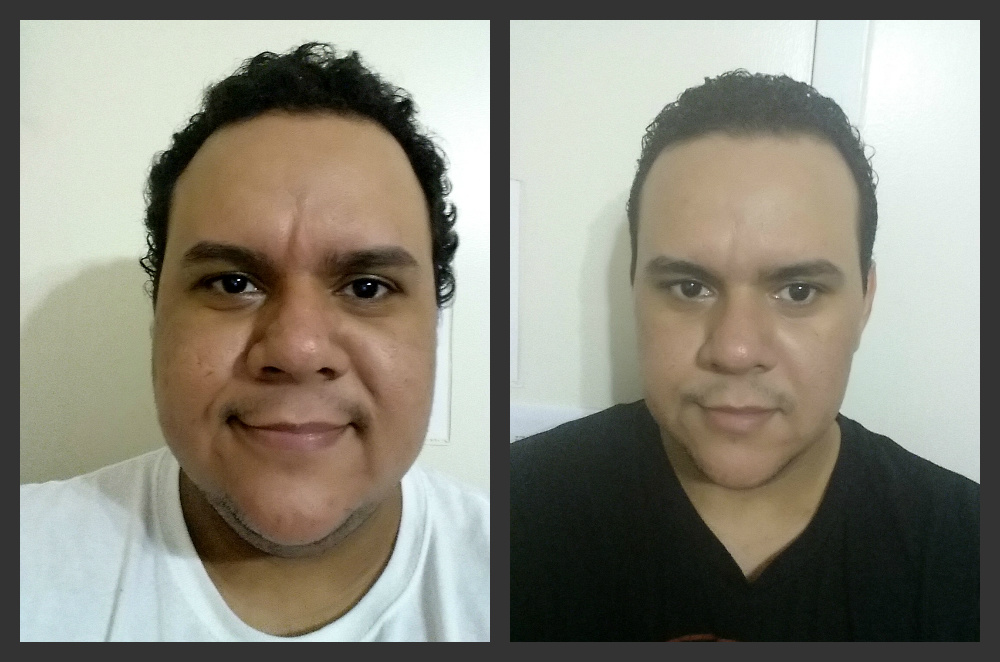
  2. Scroll the menu and tap Add to Home Screen.
  3. Tap Add in the top-right corner.
To install this app on Android
  1. Tap the 3-dot menu (⋮) in the top-right corner of the browser.
  2. Tap Add to Home screen or Install app.
  3. Confirm by tapping Install.
  • Appearance

Join BariatricPal free

  • Ask your own questions
  • Reply and follow topics
  • Message other members
  • No cost, no spam

Christian Abreu

Gastric Sleeve Patients
  • Joined

  • Last visited

  1. Christian Abreu changed their profile photo
  2.    Dwayne NM reacted to a post in a topic: NYC Sleeve support?
  3. Hi everyone! I'm from NYC and new to this website. Thought I'd say hi
  4. Hi Everyone! I'm Chris from NYC. I was sleeved on 7/28/14 and was looking for some support and new friends. I can definitely use support and encouragement from others and wouldn't mind making new friends along the way. Please PM if you'd like to text, facebook or chat sometime. My picture attached is when I started my weight loss journey in March 2014 before being sleeved. I lost 76 lbs before surgery and hope to lose more! Thanks!
  5. Hi everyone! Anyone here from NYC and want a support buddy? I'm looking for support, circle of friends and trust to go through this journey with. Wouldn't mind a text or Facebook buddies Thanks!
  6. Hi! I'm from NYC if anyone is looking for a support buddy! I know I am!
  7. Images added to a gallery album owned by Christian Abreu in Before and After Gastric Sleeve Photos
    Christian Abreu, a weight loss surgery photo album by Christian Abreu on BariatricPal. 2 photos in Before and After Gastric Sleeve Photos.
  8. Images added to a gallery album owned by Christian Abreu in Member Photo Gallery
    Untitled Album, a weight loss surgery photo album by Christian Abreu on BariatricPal. 1 photo in Member Photo Gallery.

Account

Navigation

Search

Search

Configure browser push notifications

Chrome (Android)
  1. Tap the lock icon next to the address bar.
  2. Tap Permissions → Notifications.
  3. Adjust your preference.
Chrome (Desktop)
  1. Click the padlock icon in the address bar.
  2. Select Site settings.
  3. Find Notifications and adjust your preference.