Skip to content
View in the app

A better way to browse. Learn more.

BariatricPal

A full-screen app on your home screen with push notifications, badges and more.

To install this app on iOS and iPadOS
  1. Tap the Share icon in Safari
  2. Scroll the menu and tap Add to Home Screen.
  3. Tap Add in the top-right corner.
To install this app on Android
  1. Tap the 3-dot menu (⋮) in the top-right corner of the browser.
  2. Tap Add to Home screen or Install app.
  3. Confirm by tapping Install.

toddcooper

Gastric Sleeve Patients
  • Joined

  • Last visited

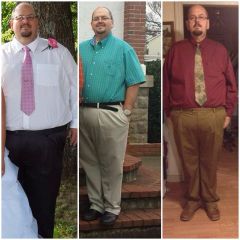
I'm Todd I have been big all my life. After years of Yoyo dieting I just gave up trying to loose weight.y doctor had told me on several occasions that if I didn't loose weight I would eventually become immobile. Soon after I started meds diabetes and increased my blood pressure meds. I started trying to loose weight. My highest weight was 500 lbs.On June 8th 2013 my son got married that day I realized what my doctor was trying to tell me if I don't Getty weight under control I won't be around to see my grand children. My first consult was in October. I got all insurance hurdles done and was sleeved December 23rd. I haven't had any real issues after surgery I try and measure all my food. I am adjusting to this new way of eating just fine. The weight is steadily dropping. My 6 month post op visit is in a few days I'm
Eager to see what I weigh. I started with a size 60 waist and I'm down To a size 48 today.

Height: 6 feet 2 inches
Starting Weight: 437 lbs
Weight on Day of Surgery: 428 lbs
Current Weight:
Goal Weight: 210 lbs
Weight Lost:
BMI:
Surgery: Gastric Sleeve
Surgery Status: Post Surgery
First Dr. Visit: 10/30/13
Surgery Date: 12/23/13
Hospital Stay: 1 Day
Surgery Funding: Insurance
Insurance Outcome: 1st Letter Approval
toddcooper's Bariatric Surgeon
Willie Melvin
Nashville, Tennessee 37204
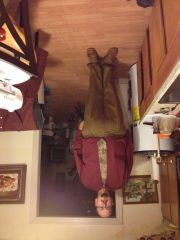
Before
After

Trending Products

PatchAid Vitamin Patches

Account

Navigation

Search

Search

Configure browser push notifications

Chrome (Android)
  1. Tap the lock icon next to the address bar.
  2. Tap Permissions → Notifications.
  3. Adjust your preference.
Chrome (Desktop)
  1. Click the padlock icon in the address bar.
  2. Select Site settings.
  3. Find Notifications and adjust your preference.