Skip to content
View in the app

A better way to browse. Learn more.

BariatricPal

A full-screen app on your home screen with push notifications, badges and more.

To install this app on iOS and iPadOS
  1. Tap the Share icon in Safari
  2. Scroll the menu and tap Add to Home Screen.
  3. Tap Add in the top-right corner.
To install this app on Android
  1. Tap the 3-dot menu (⋮) in the top-right corner of the browser.
  2. Tap Add to Home screen or Install app.
  3. Confirm by tapping Install.

taylor_holt

Gastric Sleeve Patients
  • Joined

  • Last visited

  1.    DiZia reacted to a post in a topic: I Want To See Before & After Pics! (Cont'd)
  2.    {.Narin.} reacted to a post in a topic: I Want To See Before & After Pics! (Cont'd)
  3.    MsNat3 reacted to a post in a topic: I Want To See Before & After Pics! (Cont'd)
  4.    alexsisv reacted to a post in a topic: I Want To See Before & After Pics! (Cont'd)
  5. Everyone looks fab!!! Such an inspiration :)
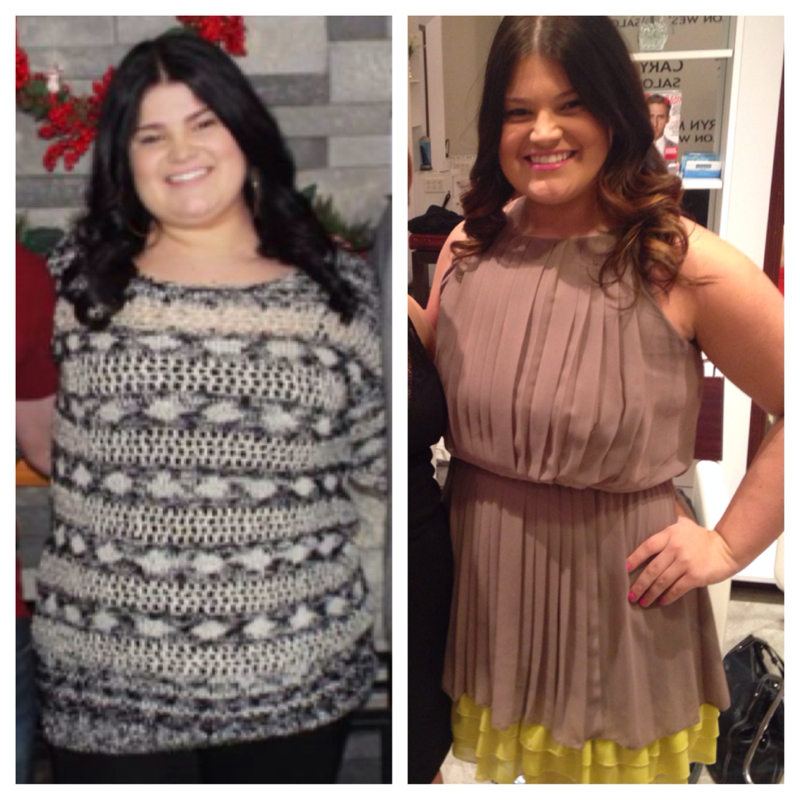
  6. Hi everyone! I was sleeved march 24th 3 weeks out and I can't believe the results already. It's amazing when you see it in picture form because physically I don't really feel much different. Starting weight:236 Current weight:202 Future goal:140-150
Trending Products

PatchAid Vitamin Patches

Account

Navigation

Search

Search

Configure browser push notifications

Chrome (Android)
  1. Tap the lock icon next to the address bar.
  2. Tap Permissions → Notifications.
  3. Adjust your preference.
Chrome (Desktop)
  1. Click the padlock icon in the address bar.
  2. Select Site settings.
  3. Find Notifications and adjust your preference.