butterflypinup
Gastric Sleeve Patients
-
Joined
-
Last visited
-
-
-
-
-
-
-
Second attempt at post today :/ So, I did it. I cut all my hair off. I do believe almost 12 inches. I also splurged and bought 100 worth of a hair system by aveida for thinning hair. My hair seems thicker and the thinning has slowed. Not sure if it's because the weight of my hair is gone. Only time will tell. I went through my closet and had a mini breakdown when I realized a shrank out of some of my favorites without realizing it. I can't afford to replace a whole closet of clothes at this time. It was nice to realize though that the cute cheap clothing stores that cater to the tiny includes myself now. Yay. Also, my local goodwill has high end pants for five and seven dollars. Another yay. No more tears. Speaking of tears. My period seems to be like clockwork since starting birthcontrol. Does this mean I'm more fertile? It's never worked like that before. I'm not ready for all that. I'm now 194 Highest 305 Surgery day 271 I've lost a small person!! Still struggling with taking Vitamins. I bought a bunch of liquid wellesse from eBay for cheap. I pray I can hold them down. This sliming crap is for the birds too. I can only do bites the size of my thumb nail and about a minute a part. I miss eating normal bites. :/. It's all worth it though. Happy hump day everyone! Huggers!

-
-
-
-
-
-
-
-
-
-
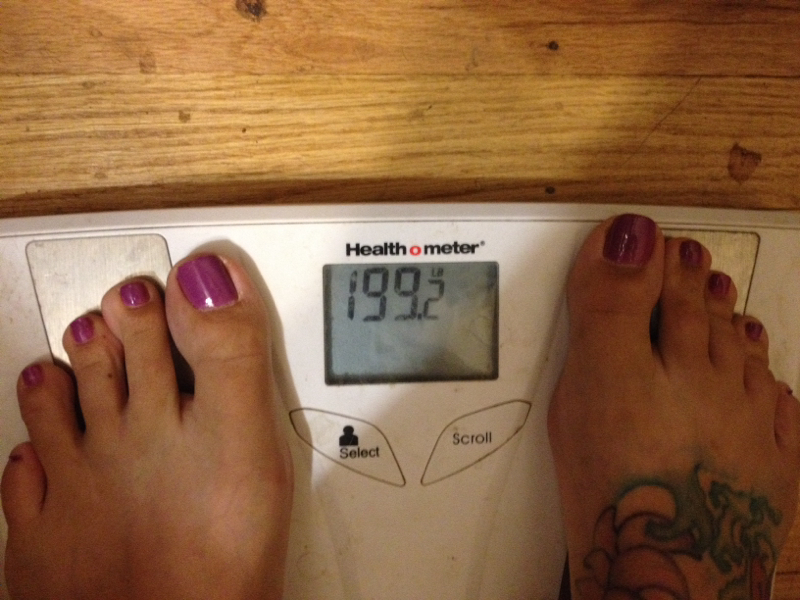
Karla I'm sorry to hear that sweety. The dating world sucks for sure but there are good guys out there still. Hugs. Our hair is only temp but our health is lasting. I just hot 1derland this morning! I can't even remember a time I weighed under 200 lbs. off to a good start this weekend.
-
-
-
-
-
-
I'm on a stall. Still 205 and hanging. Been working with my trainer four times a week starting this week. I already see a huge difference in the last three weeks in my skin but still not where I want it to be strengthwise but hey I'm a work in progress! So, I'm really happy I started dating. Since meeting Saturday me and "the man" haven't spent but one day apart. I am totally smitten. I still haven't told him about surgery. He has made lil comments about how I don't eat much. He hasn't quized me. I think it may come up tonight. I'm sooo dang nervous. He is on my Facebook and said how great I look now compared to my old picks. I don't know why it's such a big issue for me. If be okay telling him if I had a kidney, ovary, or gull bladder removed. Why is it such a big issue that I had the majority of my stomach removed? It's awesome though that we both love sushi. He orders like three different things and I eat a piece if two of each and he kills the rest. Teamwork. Lol. I'm having a hard time recognizing myself in the mirror lately. I can't believe how thin I've gotten. I'm getting upset having to keep buying new clothes. As a person who doesn't like shopping I feel like I'm doing it constantly. Thinking about finding some stuff I like and buying it in the next three sizes down. How is life everyone? I know I sound negative but life is actually really amazing. I feel so blessed. I'm ok with stalls, I'll tell the man tonight and hey it's my insides that matter, and I guess I'll find someone who loves to shop and pay them to do it for me. Hahaha
-
Yep. Hairloss has started here too. I'm afraid to brush it at all. I only wash it every three days to avoid the shower loss which always seems like more. So......I have been dating like crazy. Three to four a week at times. I FINALLY MET SOMEONE! but.....I haven't told them about surgery :/. It's still really premature but I'm afraid to tell this guy who seriously loves to eat all the time that eating is no longer my favorite thing to do. Sigh. This is the first time I have any fear about sharing my transformation story.
-
It's official 100 pounds!!!!!! Highest 305 and now 205!!!!!!!!!!!!!
-
1) Height / weight starting our wls programs:5 9 2) Weight day of surgery: 271 3) 16 week post op weight pounds lost/gained: 209 4)Goal weight: 190 5) Your biggest success this week: I hired a personal trainer and I hit the gym 6) Your biggest struggle this week: dating. Is there any normal men in this world? Lol ok so struggle weightloss wise is not recognizing this woman in size 13 clothing. Seriously hope my brain catches up soon.
-
1) Height / weight starting our wls programs 5'9" 280: 2) Weight day of surgery: 271 3) 14 post op weight pounds lost/gained: 215 (I cheated because last night the scale said 218 so I waited til this morning) 4) Goal weight: 190 stretch 170 5) Your biggest success this week: my attitude, staying positive hasn't always been easy since I have had so many complication but I have done it. The house buying and Reno started to make me depressed but I was able to snap out of it no problem. 6) Your biggest struggle this week: heartburn. I wake up with it. I go to bed with it. Have it in the morning have it in the evening have it at supper time. You know you all sang that out loud. . P.s. Dating is getting better. Let's hope I catch a good one who sticks. Lol.
-
! 1) Height / weight starting our wls programs: 5'9" 2) Weight day of surgery: 271 3) 13 week post op weight pounds lost/gained: 215. 56 90 from my highest!!!! 4) Goal weight: 170 realistic 190 5) Your biggest success this week: staying focused. Eye on the prize 6) Your biggest struggle this week: dating, oh how cruel the dating world is. :/
-
I hit the 50 lb mark! I have 21 to go til onederland. I'm ready. I bought a couple new shirts today too. I looked at my sister and said "I have a hard time believing I'm this thin" it feels like I'm picking out clothes for someone else and seeing someone else in the mirror. I feel pretty awesome!
-
1) Height / weight starting our wls programs: 5'9" 290 2) Weight day of surgery: 271 3) 12 week post op weight pounds lost/gained: 222 haven't gotten on scale in two days 4) Goal weight: 170 realistic 190 5) Your biggest success this week: Staying positive. Loving my new job. :-D 6) Your biggest struggle this week: Looking at my ass and realizing without actual working out I have developed to round pancakes. :-0 lol!! Time to hit the gym now that food vitamins and water are on track for the most part!!!
-
. Just remember your body has no clue what's going on just like you. It's in a constant state of shock. When I weigh everyday the scale is all over the plAce. I only weigh on check in day now. Focus on NSVs for now. It will happen sweets. just keep making healthy choices. I have banned myself from elevators this week. Next week I'm going to park the furthest from the doors to places. Let's hope I don't die of heat stroke. Lol. Hugs!
-
Post op pics
-
http://www.trueactivist.com/7-things-to-remember-when-you-think-youre-not-good-enough/#.U7sWYH_cP2E.facebook 7 things to remember when you think your not good enough! 1.The people you compare yourself to compare themselves to other people to. 2.Your mind can be a very convincing liar. 3.There is more right with you than wrong with you. 4.You need love the most when you feel you deserve it the least. 5.You have to fully accept and make peace with the "now" before you can reach and be satisfied with the "later". 6.Focus on progress rather than perfection and on how far you've come rather than on how far you have left to go. 7.You can't hate your way to loving yourself.
-
http://www.trueactivist.com/7-things-to-remember-when-you-think-youre-not-good-enough/#.U7sWYH_cP2E.facebook 7 things to remember when you think your not good enough! 1.The people you compare yourself to compare themselves to other people to. 2.Your mind can be a very convincing liar. 3.There is more right with you than wrong with you. 4.You need love the most when you feel you deserve it the least. 5.You have to fully accept and make peace with the "now" before you can reach and be satisfied with the "later". 6.Focus on progress rather than perfection and on how far you've rather than on how far you have left to go. 7.You can't hate your way to loving yourself.
-
http://www.trueactivist.com/7-things-to-remember-when-you-think-youre-not-good-enough/#.U7sWYH_cP2E.facebook 7 things to remember when you think your not good enough! 1.The people you compare yourself to compare themselves to other people to. 2.Your mind can be a very convincing liar. 3.There is more right with you than wrong with you. 4.You need love the most when you feel you deserve it the least. 5.You have to fully accept and make peace with the "now" before you can reach and be satisfied with the "later". 6.Focus on progress rather than perfection and on how far you've rather than on how far you have left to go. 7.You can't hate your way to loving yourself.