Skip to content
View in the app

A better way to browse. Learn more.

BariatricPal

A full-screen app on your home screen with push notifications, badges and more.

To install this app on iOS and iPadOS
  1. Tap the Share icon in Safari
  2. Scroll the menu and tap Add to Home Screen.
  3. Tap Add in the top-right corner.
To install this app on Android
  1. Tap the 3-dot menu (⋮) in the top-right corner of the browser.
  2. Tap Add to Home screen or Install app.
  3. Confirm by tapping Install.
  • Appearance

Join BariatricPal free

  • Ask your own questions
  • Reply and follow topics
  • Message other members
  • No cost, no spam

Oslove03

Pre Op
  • Joined

  • Last visited

  1.    PrettyThick1 reacted to a post in a topic: I have Fallen of the wagon
  2. I'm a year post-op and feel like I can eat anything in moderation.. but I still find my self getting a kids meal and a pie to take home I know it's bad and I keep telling my self no but I always end up in the drive-t I need help... And I know it I'm at goal wait 160 and I'm supper scared that I'm going to gain it back I started at 241lb and I've come a long way to be sucker back in....
  3.    dreamscometrue reacted to a post in a topic: Happy....!
  4.    Dani.o.dani reacted to a post in a topic: Happy....!
  5.    ReDbEaN reacted to a post in a topic: Happy....!
  6.    BethinPA reacted to a post in a topic: Happy....!
  7.    Branmuffin reacted to a post in a topic: Happy....!
  8.    AshleyMidwife reacted to a post in a topic: Happy....!
  9.    notmeanymore reacted to a post in a topic: Happy....!
  10.    ProudGrammy reacted to a post in a topic: Happy....!
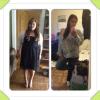
  11. It's been a year!!!!! and I feel great and look it my whole life has change and I love it. Best choice ever Start weigh 267 Weigh today 150 and still going down ⬇️
Account

Navigation

Search

Search

Configure browser push notifications

Chrome (Android)
  1. Tap the lock icon next to the address bar.
  2. Tap Permissions → Notifications.
  3. Adjust your preference.
Chrome (Desktop)
  1. Click the padlock icon in the address bar.
  2. Select Site settings.
  3. Find Notifications and adjust your preference.