





calimomof4
Gastric Bypass Patients
-
Joined
-
Last visited
Everything posted by calimomof4
-
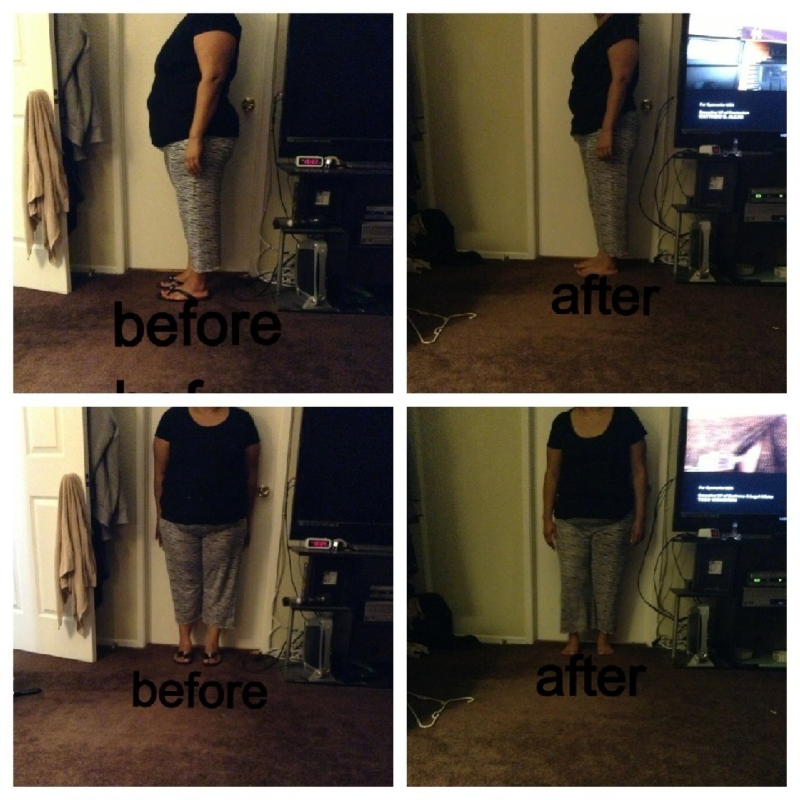
thanks! my sw 220 today 187
-
surgery was july 22 2013 here is a current picture [ATTACH]4982[/ATTACH]
-
thanks so much!
-
can you e-mail me too please. mariejackson27@hotmail.com
-
thanks!
-
thank you so much for replying. yes it is peachy. I go in tomorrow @ 10 . just scared thinking the worse.
-
ok just a few minutes ago I was standing in line to pay & i felt my dress wet. my incision from my belly button is draining and it looks orange. anybody have this happen
-
good for you!yes it is a bummer.today has been hard with followingthe liquid diet. I feel so sick. this sounds gross but I have hemorrhoids now I never have had one. did anyone else get diarrhea from this pre op liquid diet?hope all goes well.Thanksbest wishes on your journey to living a healthy life,hi I'm new here. my surgery is Monday and I'm feeling nervous too.
Account
Navigation
Search
Configure browser push notifications
Chrome (Android)
- Tap the lock icon next to the address bar.
- Tap Permissions → Notifications.
- Adjust your preference.
Chrome (Desktop)
- Click the padlock icon in the address bar.
- Select Site settings.
- Find Notifications and adjust your preference.
Safari (iOS 16.4+)
- Ensure the site is installed via Add to Home Screen.
- Open Settings App → Notifications.
- Find your app name and adjust your preference.
Safari (macOS)
- Go to Safari → Preferences.
- Click the Websites tab.
- Select Notifications in the sidebar.
- Find this website and adjust your preference.
Edge (Android)
- Tap the lock icon next to the address bar.
- Tap Permissions.
- Find Notifications and adjust your preference.
Edge (Desktop)
- Click the padlock icon in the address bar.
- Click Permissions for this site.
- Find Notifications and adjust your preference.
Firefox (Android)
- Go to Settings → Site permissions.
- Tap Notifications.
- Find this site in the list and adjust your preference.
Firefox (Desktop)
- Open Firefox Settings.
- Search for Notifications.
- Find this site in the list and adjust your preference.