G-MaYoYo
Gastric Bypass Patients
-
Joined
-
Last visited
-
-
-
-
-
-
-
-
You look awesome!!!
-
You will be find - remember take this journey one step at a time....
-
-
-
no dumping!!!!
-
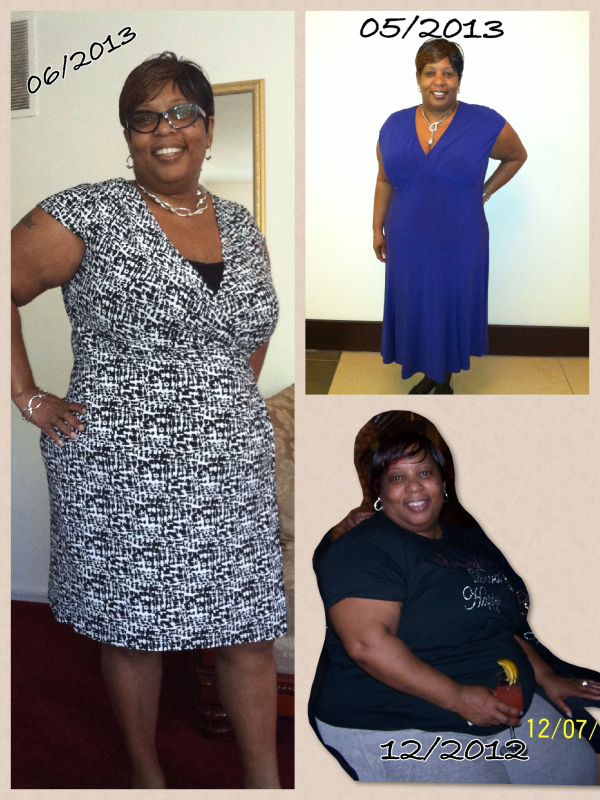
Next week will be a year that I had surgery.. I have lost almost 100 lbs and loving my new journey call life!!! SD 1/3/13 289 lbs Today 12/29/13 197 lbs

-
~~ Happy Birthday to everyone that birthday is today....I had my first sweets today since my surgery 7 months ago (one spoonful of Peach Cobbler)- It was sooooooooo good (I felt like Martin in the movie "Life" when he ran and ate the blueberry cobbler.... Anywho ~~20 yrs ago I wore a size 6 1/2; last week I went out to buy some shoes - I am back in size 6 1/2 from a 7 1/2... So to answer your question, you will lose weight in your feet.... HW 289 SD 1/3/13 CW 207 82 lbs down!!!HW 289 CW 207 SD 1/3/2013 82 lbs down!!!!
 WELL~ I have only lost 70 lbs since Jan 3rd.. Want to hit that 200 mark so bad!!! HW ~ 289 SW ~ 289 CW ~ 219 Now don't get me wrong, I am feeling great and looking good!!!!You look great!!!!WOW!!!! My prayer today is to heal your boyfriend and give you guys some normalities back into your life - Dang I thought constipation was something!!! Peace and Blessings...Take it easy and don't rush the process... Some people are more sensitive than others. I couldn't eat for a least a 6 weeks. (6 months out now)... As long as you are getting you protein down you are fine...HW 289 SW 289 (1/7/13) CW 213 76 lbs gone!! GW????? Just want to look healthy
 70 lbs down since January 2013