
Krystal7k
Gastric Bypass Patients
-
Joined
-
Last visited
Everything posted by Krystal7k
-
Good luck everyone its hard to believe April's almost already goneI thank it is because pus comes out I been putting antibiotic cream on itI go to the dr tomarrow so it should be okI had five incision wonder why its differntmy daughter should be exhausted we've been so busy today I know I'm tiredI'm up with my 6 year old little girl lolI no I figured they would of sewed it or glued but no I have 15 staplesIts pretty bad when in counting down until monday so I can see the dr im more worried about getting these damn things out then I am about foodthat would make sense because all my incision sites look like thisYeah it hurts but I have a appt. Monday do you thank it will be okYou look skinner all over[ATTACH]3349[/ATTACH] is this normal
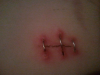 How long did they keep your staples inThats awesome
Account
Navigation
Search
Configure browser push notifications
Chrome (Android)
- Tap the lock icon next to the address bar.
- Tap Permissions → Notifications.
- Adjust your preference.
Chrome (Desktop)
- Click the padlock icon in the address bar.
- Select Site settings.
- Find Notifications and adjust your preference.
Safari (iOS 16.4+)
- Ensure the site is installed via Add to Home Screen.
- Open Settings App → Notifications.
- Find your app name and adjust your preference.
Safari (macOS)
- Go to Safari → Preferences.
- Click the Websites tab.
- Select Notifications in the sidebar.
- Find this website and adjust your preference.
Edge (Android)
- Tap the lock icon next to the address bar.
- Tap Permissions.
- Find Notifications and adjust your preference.
Edge (Desktop)
- Click the padlock icon in the address bar.
- Click Permissions for this site.
- Find Notifications and adjust your preference.
Firefox (Android)
- Go to Settings → Site permissions.
- Tap Notifications.
- Find this site in the list and adjust your preference.
Firefox (Desktop)
- Open Firefox Settings.
- Search for Notifications.
- Find this site in the list and adjust your preference.