Bea Amaya
Gastric Sleeve Patients
-
Joined
-
Last visited
Everything posted by Bea Amaya
-
It's been a long time since I visited this site, but I've hit a spot in my life where I'm struggling and realizing I need to go back and find some support to help me through it. I currently live in the Middle East, in a small country called Qatar located on a peninsula next to Saudi Arabia. I am a researcher/instructor at the Texas A&M University campus and have been here since the middle of September. When I arrived here, I was weighing in the low-to-mid 170s every day. After only 3.5 months here, I just this morning crossed the 190 line, something I thought I'd NEVER do again. Food choices here are good, but my ability to make proper choices is hampered somewhat. I do not have access to the protein shakes that I love and learned to rely on, I do not have access to good nutritional information about foods I find here, and I do not have access to the low calorie selections that were the staple of my life before moving here (low-cal bread, sugar free jello, Progresso Light soups, etc.) I'm trying so hard to get back on the bandwagon, realizing that I really only have a short window of time to get control before things get totally out of hand. So here I am, back again, planning on hanging out here again in order to pick up tips, keep the focus on good health, and interact with the community that understands. Bea from Doha, Qatar (Surgery date: July 30, 2013)

-
Bea Amaya, a weight loss surgery photo album by Bea Amaya on BariatricPal. 3 photos in Before and After Gastric Sleeve Photos.
-
Awesome news, Shell. Too bad about the meds, but GREAT news about your progress! Can't wait to see what happens at the next check-up. You're on your way now!
-
Great reports coming in today! LOTS of people making goal...what a wonderful way to celebrate this holiday! Here are some of my "linking" tips: The best way to link to a thread is to go to page one of that thread, then copy the address in the menu bar at the top of your browser window. For example, when I go to page one of this topic, what I see at the top is "www.bariatricpal.com/topic/308570-4th-of-july-challenge". When I copy that address, then create (or edit) this post, I can just paste the link here (using Ctrl+v on Windows, or right-click...paste), like this...http://www.bariatricpal.com/topic/308570-4th-of-july-challenge/. When I use the paste function, the forum automatically changes it to a nice, clickable link. When I'm copying links from several different places (photos, forums, trending topics, etc.) the easiest way for me to do this is to open a second tab in my browsers, go the the place I want to copy from in that browser, copy the address at the top of the page, switch back to this tab, and paste the link here. For example I saw an interesting topic title in "Trending Topics" called "My surgeon was just arrested!" I have it open in my second tab, have copied the address, and will now paste it here...http://www.bariatricpal.com/topic/312731-my-surgeon-was-just-arrested/ Hope this helps! P.S. After posting the note above and checking to make sure it was correct, I noticed something I forgot to mention. BariatricPal tends to shorten the text for a long, copied hyperlink to keep it more neat and manageable. You'll notice that both of the links in the post above are, well, abbreviated. If you're curious about the entire name, you can either click on it to go to it, or hover over it and (depending on your browser and settings) see it in a pop-up banner at the bottom of the browser window.
-
LOL! Post when you need to. As always, we're flexible here.
-
4th of July Challenge, Week 4 Border Crossings Group average this week: 2.3 lbs lost Group losses this week: 189.8 lbs (82 reporting in) Total losses for the challenge: 798.9 lbs!!! 320s to 310s :: daw3378 280s to 270s :: beteroo 270s to 260s :: elfnow 260s to 250s :: heatherdawn 220s to 210s :: Nurseygirl, ashes304 200s to 190s ONEDERLAND!!!:: pharmd08, getnhealthyintx, Sherry73 180s to 170s :: Beach Lover 150s to 140s :: livvsmum As always, my apologies if I missed anyone!
-
Several people have volunteered to be cheerleaders and supporters. I suggest you go ahead and start a new thread for the next challenge. That way we can point people to it (by putting a link in here) and they can get ready for the next go 'round. Thanks so much for volunteering!
-
I am a bit overwhelmed with work these days as I prepare to relocate to the Middle East. I will be taking a leave of absence from my regular job for 9 months in order to 1) complete my PhD, and 2) do something I've always wanted to do...teach in a university classroom. I am currently jumping through hoops in order to prepare my company for my leaving as well as meeting all of the strict requirements for working overseas. I will be working at the Texas A&M Qatar campus and couldn't be more excited. There are drawbacks, of course, including a serious cut in pay (I'll be making 1/7th of my current salary, and I'm the primary breadwinner!) Also, my husband will not be coming with me for this assignment, although we are hoping we can plan a trip for him to come for a visit around Christmas. I'm telling all of this to let you know that I will not be able to manage the data for another challenge after this one. While I've had a heck of a lot of fun with these, I am just a bit overwhelmed at the moment and need to take a break. I hope that someone from this group will pick up the baton and run with it. I'm hoping someone will come up with some new ideas for the group, some new and exciting ways to keep people active, motivated, and engaged. I will miss this part of my week, this checking up on everyone and marking the group's progress, but I am in need of a break and can't figure a way around it. Can't wait to find out who is going to volunteer to take the lead next! Thanks so much, Bea
-
4th of July Challenge, Week 3 Border Crossings Group average this week: 2.1 lbs lost Group losses this week: 174.6 lbs (85 reporting in) Total losses for the challenge: 613.4 lbs!!! 340s to 330s :: GoldnGirl6677 330s to 320s :: daw3378 260s to 250s :: joy59 240s to 230s :: mrslb5, Lynne1029 230s to 220s :: deanask8te, JLynn14, hmk715 220s to 210s :: Nurse_B, pinkbarbie 210s to 200s :: mtodd1205, Hunter 190s to 180s :: moveandgroove, Slimk 180s to 170s :: BeaAmaya, gomekast 170s to 160s :: DeezJeanz, Evolving, cprince1975 As always, my apologies if I missed anyone!
-
That is crazy awesome, Janet! Sounds like you're about ready to move into "maintenance" mode. Congrats for your successes. Enjoy!!!
-
4th of July Challenge, Week 2 Border Crossings Group average this week: 2.2 lbs lost Group losses this week: 192.3 lbs (88 reporting in) Total losses for the challenge: 450.8 lbs!!! 280s to 270s :: beachplum, elfnow 270s to 260s :: Krystal0528 260s to 250s :: InfiniteButterfly 250s to 240s :: JodiePaige, right for me? 240s to 230s :: hrhlaurie 230s to 220s :: jenny13 220s to 210s :: hiccupingduck, mcginn0425, BlondeBanshee, pjpanda 210s to 200s :: covatila84 190s to 180s :: KatieJo04, StrawberryPolly, CathySleever 170s to 160s :: Healthier2day1227, BestKaren 160s to 150s :: No More Shelly Belly, onsummit 140s to 130s :: EarthyGoalie, dommeno As always, my apologies if I missed anyone!
-
Holy Hot Momma! That pic is gorgeous in the blue dress! You look amazing! Daddy's a lucky guy! I know this sounds backwards but I'm so proud of you and I can't wait to look as half as amazing as u someday! Love u! Too sweet, Shell! Thanks for the kind words. And your Dad and I both feel lucky, that's for sure. Thanks again, sweetie!
-
Tried to look at the data-- forgot my starting and goal lol it says file not found Hmm...when I clicked on the link above, the one embedded in your message, it opened right up. Can someone else chip in and let us know whether you can see the file or not? I'll try to troubleshoot, but need to know if no one can see it or if only some of you are having trouble. THANKS!
-
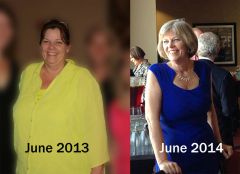
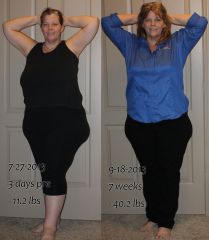
I've been struggling a bit in that I've reached that point where the sleeve has really done it's part and now it's time for me to need to WORK for the losses. I've been a whole month with no appreciable changes, just fluctuations of 3 lbs up and down the scale. Then I pulled out two photos taken a year apart and realize that I've come a long way already. I have nothing to be discouraged about and realize that this last 25 lbs. is just going to take some patience, planning, and persistence. Here's the photos:
-
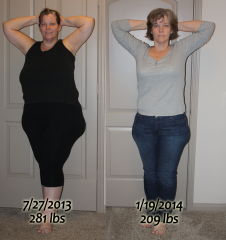
Photos of my journey along the way.
-
Wowsers...sound you had a WONDERFUL week! Congrats on having your loved ones around you this week...ENJOY!
-
Congrats on your wedding! Much happiness to you and your hubby! And congrats for hanging in there on your losses. :-)
-
4th of July Challenge, Week 1 Border Crossings 340s to 330s :: daw3378 310s to 300s :: mark! 290s to 280s :: beachplum 280s to 270s :: Krystal0528, Sleeve Siren 270s to 260s :: joy59 260s to 250s :: heatherdawn, kimba6999, Luvin_Life125 250s to 240s :: danaevett, hrhlaurie 240s to 230s :: alice4914, Lynnc121 230s to 220s :: Susan-031314, pinkbarbie 220s to 210s :: Nicey2u, sassyd1999 210s to 200s :: getnhealthyintx 200s to 190s ONEDERLAND!!! :: Danni-doinit4me, Anababy, Bluesea71, Stephsjourney, nillee 190s to 180s :: dreamscometrue, Ree 180s to 170s :: Gettingsexyback, hockeywife91 170s to 160s :: KimberlyBranco7, longtimecoming7, Yoga lady 160s to 150s :: JanetPRN As always, my apologies if I missed anyone!
-
Awesome! Welcome to onderland!
-
Awesome! Another one made it to Onderland!
-
Another one in Onderland! Congrats!
-
Cool! Welcome to ONEDERLAND!
-
Thinking of you today. I wish I had some solid advice to share with you, but I think you are doing all the right things. My longest stall was a little over 4 weeks when I saw a huge (and annoying) see-saw of weights, and ended up losing just over 1 lbs in a month. It was a little disheartening, but due to what I've read in these forums, it was no surprise. I can't wait to get a report from you here letting us know the stall is broken and you're off and running again. Hang in there and know that we all know how you feel and are thinking of you!
-
Absolutely! Welcome to the Challenge!
-
I'm just finishing up 2 weeks of a research/writing retreat at my university (Texas Tech) in pursuit of my PhD (hopefully done by Christmas). While the get-away was just what I needed to make substantial progress, it also had its downside. When I am in my apartment back in Houston I feel in full control of my health, exercise, and eating habits. Here, with a different focus to distract my journey, I have had 2 weeks of old habits (primarily, that of "grazing") rear its ugly head. My weight is up again, although thankfully less than 2 lbs, but it's the other thing, the ignoring of all those things I've learned about my body and what it needs from me over the past 10 months of my journey, that has me a little worried. I'll be headed for home on Sunday and hope this will be a huge lesson learned for me. My surgery has given me a new lease on life but it's no magic cure. I have to keep working, keep paying attention, keep listening to my mind and body both. As I prepare to move overseas in less than 90 days (moving to Qatar, next to Saudi Arabia in the Middle East) I need to begin thinking about how to maintain control of my eating habits when I'm not in my little safe cocoon. I have lots of work to do to prepare for this move so I really need this challenge to help me get ready. Weighing in at 182.2 today (up from a low of 180.8) here's hoping that ALL of us have a successful 4th of July Challenge!