Skip to content
View in the app

A better way to browse. Learn more.

BariatricPal

A full-screen app on your home screen with push notifications, badges and more.

To install this app on iOS and iPadOS
  1. Tap the Share icon in Safari
  2. Scroll the menu and tap Add to Home Screen.
  3. Tap Add in the top-right corner.
To install this app on Android
  1. Tap the 3-dot menu (⋮) in the top-right corner of the browser.
  2. Tap Add to Home screen or Install app.
  3. Confirm by tapping Install.
  • Appearance

Join BariatricPal free

  • Ask your own questions
  • Reply and follow topics
  • Message other members
  • No cost, no spam

Mon22

Gastric Sleeve Patients
  • Joined

  • Last visited

Everything posted by Mon22

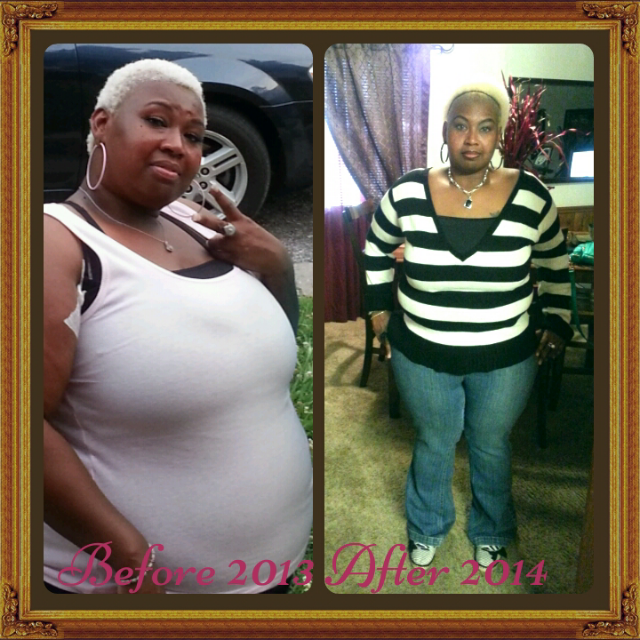
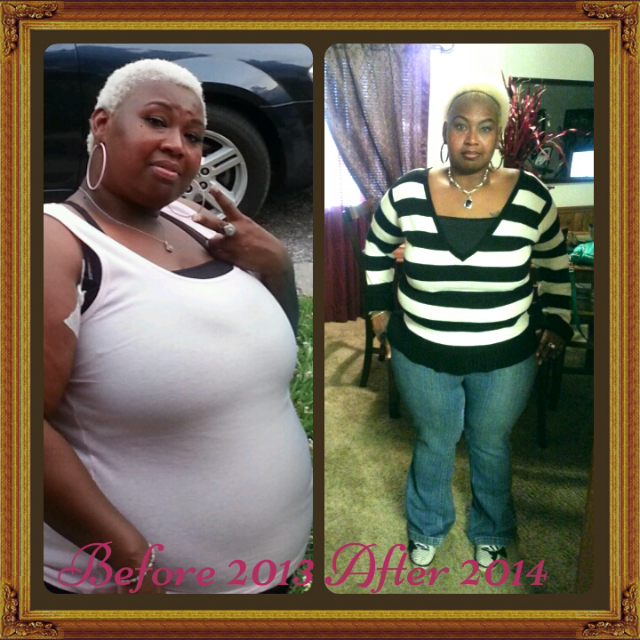
  1. Surgery oct 21 2013..3 month update sw 276 cw 230 gw 150..feeling good just need to exercise more good luck n good job oct sleevers:))
  2. Hw 292 Sw 276 Cw 236 Sleeved Oct 21 2013..Im 3mths post op this has been challenging in some many way but worth every obstacle. Gw I want to reach 140-150.
  3. Hw 292 Sw 276 Cw 236 Sleeved oct 21 2013..Im 3mths post op this has truly been a journey and I still have more to lose. My goal is to reach 150.
  4. Surgery Oct 21 2013 SW 276 CW 264 Goal Weight 150
  5. Thank you akusah..same too you
  6. Surgery today on my way to the hospital check at 7:30..Good luck all October sleevers:)
  7. I start my liquid diet tomorrow for 2weeks hope I can be strong and not cheat really need to make sure I do right for my surgery May 2oth )

Account

Navigation

Search

Search

Configure browser push notifications

Chrome (Android)
  1. Tap the lock icon next to the address bar.
  2. Tap Permissions → Notifications.
  3. Adjust your preference.
Chrome (Desktop)
  1. Click the padlock icon in the address bar.
  2. Select Site settings.
  3. Find Notifications and adjust your preference.