





Fluffy62
Gastric Sleeve Patients
-
Joined
-
Last visited
Everything posted by Fluffy62
-
Hopefully soon. I have to muster the courage to do the before pic with no shirt on, now that pic was embarrassing.
-
Thank you!!!
-
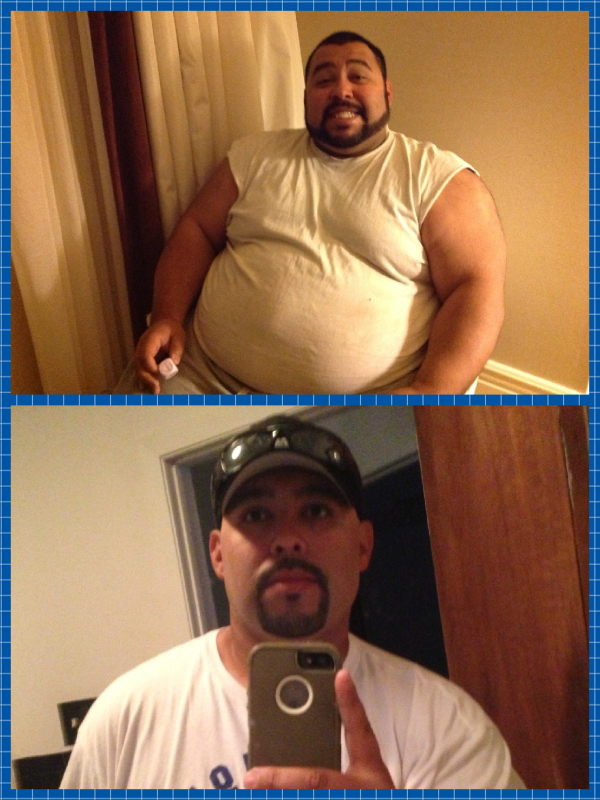
Top picture is from Christmas 2012 Bottom picture is from Memorial Day weekend 2013 Journey started in January HW 369 Date of Op 338 CW 268

-
Drink Water, water, and Oh did I mention water!!! It helps put the elasticity back into your skin. BUT depending on how big you were when you started you might have the extra skin regardless(which is the case for me unfortunately). Good luck!!!!
-
To anyone who wants to be added to the FB page send your email to bigdaddyjoe he's the admin. You have to be invited.I was doing soft foods and fish (tuna and tilapia) 2 weeks out.Wow all of you are BIG LOSERS!!! I congratulate you!!!!!! Since surgery I've lost 30#'s. Pre and Post Op I've lost a total of 61#'s!!! Now for my question, how much are you eating at a sitting? 4 oz? 6 oz? 8 oz? Or are you eating till full? Today I feel like I've eaten a lot more than yesterday. I'm getting concerned, I don't want to stretch my sleeve out!The liquid phase after the procedure, in my opinion, is the worst and hardest. I had mine done on 3/27, right before Easter. That Easter Sunday at my family's house was bad, I left the room. That's how I dealt with it. And as far as the food goes, I can't believe how little I'm eating. Thing is, I'm full. Just trust your Dr and NUT's plan.The March 2013 Sleevers group.I actually just had my first mushy food since the surgery. And it sucks!!!! I have this pain in my chest that comes and goes. But other than that everything is good! Lost almost 60lbs since I started my journey in January. So overall I'm happy! How are things going for you?Same! I was on the 9th floor room 916. LolYup I was just sleeved 3/27. Where was your procedure done?My surgeon is from Springfield too! Who's your surgeon? Mine is Dr. Forrester.I sent the invite to ur emailSend it to me I found how to do it on my phoneHey March Sleevers. As an FYI, some of us from another thread (Any march Sleevers?) made a Facebook page. It's private. For anyone who wants to join go to the thread and just put ur email up and someone will invite you.Fluffy62, a weight loss surgery photo album by Fluffy62 on BariatricPal. 2 photos in Before and After Gastric Sleeve Photos.Hey I found this article on slider foods and it helped me understand it better. http://5daypouchtest.com/articles/art002.html And as far as stalls, I think eventually everyone goes through one. I think the biggest thing is to try not to get too frustrated. The most common stall is the 3 week stall. I think it's because many people are transitioning to mushy or purée foods and the body needs to adjust(that's just my logic don't quote me on it).Isn't it horrible!!!! Between the Reese's Eggs and Mini-Cups there must be at least a bag full in my house. Not to mention the chocolate bunnies. And every time I pass by they laugh at me so what do I do, I LAUGH BACK!! Food does not rule me!!!!


Account
Navigation
Search
Configure browser push notifications
Chrome (Android)
- Tap the lock icon next to the address bar.
- Tap Permissions → Notifications.
- Adjust your preference.
Chrome (Desktop)
- Click the padlock icon in the address bar.
- Select Site settings.
- Find Notifications and adjust your preference.
Safari (iOS 16.4+)
- Ensure the site is installed via Add to Home Screen.
- Open Settings App → Notifications.
- Find your app name and adjust your preference.
Safari (macOS)
- Go to Safari → Preferences.
- Click the Websites tab.
- Select Notifications in the sidebar.
- Find this website and adjust your preference.
Edge (Android)
- Tap the lock icon next to the address bar.
- Tap Permissions.
- Find Notifications and adjust your preference.
Edge (Desktop)
- Click the padlock icon in the address bar.
- Click Permissions for this site.
- Find Notifications and adjust your preference.
Firefox (Android)
- Go to Settings → Site permissions.
- Tap Notifications.
- Find this site in the list and adjust your preference.
Firefox (Desktop)
- Open Firefox Settings.
- Search for Notifications.
- Find this site in the list and adjust your preference.