Skip to content
View in the app

A better way to browse. Learn more.

BariatricPal

A full-screen app on your home screen with push notifications, badges and more.

To install this app on iOS and iPadOS
  1. Tap the Share icon in Safari
  2. Scroll the menu and tap Add to Home Screen.
  3. Tap Add in the top-right corner.
To install this app on Android
  1. Tap the 3-dot menu (⋮) in the top-right corner of the browser.
  2. Tap Add to Home screen or Install app.
  3. Confirm by tapping Install.
  • Appearance

Join BariatricPal free

  • Ask your own questions
  • Reply and follow topics
  • Message other members
  • No cost, no spam

klmyers1956

LAP-BAND Patients
  • Joined

  • Last visited

  1.    kll724 reacted to a gallery image: IMG 2407
  2. Images added to a gallery album owned by klmyers1956 in Before and After Lap Band Photos
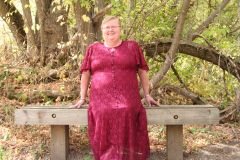
    Kathy's pics, a weight loss surgery photo album by klmyers1956 on BariatricPal. 5 photos in Before and After Lap Band Photos.
  3. This is me lately. I had surgery in March of 2011. I started at 255 pounds and got down to 202 and since then have been struggling to lose weight. I currently weigh 217 pounds. I have had a lot of health issues before and after the surgery including numerouse back surgeries-to many to count so exercise has been an issue. I keep trying, though, and that says a lot in itself. I would like to find a mental, or buddy that would be willing to help me with all types of issues including psychological, health, and nutrition issues. Thanks for listening and hope to hear from someone soon.


Account

Navigation

Search

Search

Configure browser push notifications

Chrome (Android)
  1. Tap the lock icon next to the address bar.
  2. Tap Permissions → Notifications.
  3. Adjust your preference.
Chrome (Desktop)
  1. Click the padlock icon in the address bar.
  2. Select Site settings.
  3. Find Notifications and adjust your preference.