Skip to content
View in the app

A better way to browse. Learn more.

BariatricPal

A full-screen app on your home screen with push notifications, badges and more.

To install this app on iOS and iPadOS
  1. Tap the Share icon in Safari
  2. Scroll the menu and tap Add to Home Screen.
  3. Tap Add in the top-right corner.
To install this app on Android
  1. Tap the 3-dot menu (⋮) in the top-right corner of the browser.
  2. Tap Add to Home screen or Install app.
  3. Confirm by tapping Install.
  • Appearance

  • Entry

    1
  • Comments

    2
  • Views

    902

About this blog

May 1st-----July 24th

Entries in this blog

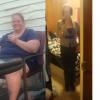
Almost 3 months ago I had gastric bypass surgery, I have since lost 71 lbs. WHICH FEELS AMAZING! I am absolutely not where I want to be yet, but am well on my way. Its been an adjustment for me, not so much they way you have to change eating, but i'm not realizing when my clothes aren't fitting properly anymore. I understand I'm losing weight but I'm not seeing myself as a thinner person. Not just yet at least. I'm hoping that'll come in time!!   I was lucky, I have had no issues with any foo

Account

Navigation

Search

Search

Configure browser push notifications

Chrome (Android)
  1. Tap the lock icon next to the address bar.
  2. Tap Permissions → Notifications.
  3. Adjust your preference.
Chrome (Desktop)
  1. Click the padlock icon in the address bar.
  2. Select Site settings.
  3. Find Notifications and adjust your preference.