




Skip to content
View in the app

A better way to browse. Learn more.

BariatricPal

A full-screen app on your home screen with push notifications, badges and more.

To install this app on iOS and iPadOS
  1. Tap the Share icon in Safari
  2. Scroll the menu and tap Add to Home Screen.
  3. Tap Add in the top-right corner.
To install this app on Android
  1. Tap the 3-dot menu (⋮) in the top-right corner of the browser.
  2. Tap Add to Home screen or Install app.
  3. Confirm by tapping Install.
  • Appearance

  • Entries

    3
  • Comments

    2
  • Views

    1,316

About this blog

Talking about everything to do with Weight Loss Surgery in Mexico

Entries in this blog
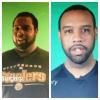
When I first started this journey I had already made many efforts to lose weight. I had gotten up to 360lbs and lost a lot of weight doing Optifast 800. I believe I made it down to 292lbs only to gain it all back and add even more weight. At the height of my despair I was 404lbs or at least that is the highest I ever saw on the scale. The Journey from that to what you see today (I am still losing at a steady 1-2lbs per week) has been very interesting. I would attribute all of it to Weight L

Account

Navigation

Search

Search

Configure browser push notifications

Chrome (Android)
  1. Tap the lock icon next to the address bar.
  2. Tap Permissions → Notifications.
  3. Adjust your preference.
Chrome (Desktop)
  1. Click the padlock icon in the address bar.
  2. Select Site settings.
  3. Find Notifications and adjust your preference.