Skip to content
View in the app

A better way to browse. Learn more.

BariatricPal

A full-screen app on your home screen with push notifications, badges and more.

To install this app on iOS and iPadOS
  1. Tap the Share icon in Safari
  2. Scroll the menu and tap Add to Home Screen.
  3. Tap Add in the top-right corner.
To install this app on Android
  1. Tap the 3-dot menu (⋮) in the top-right corner of the browser.
  2. Tap Add to Home screen or Install app.
  3. Confirm by tapping Install.
  • Appearance

Join BariatricPal free

  • Ask your own questions
  • Reply and follow topics
  • Message other members
  • No cost, no spam

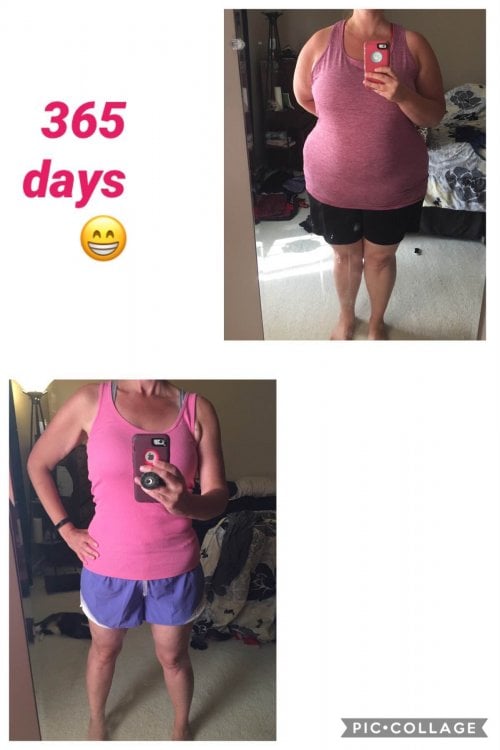
365 days later

  • Popular Post
It has been such an amazing journey
123 pounds gone forever!!!!

image-0.00596046447753906.jpg

  • Replies 16
  • Views 2.1k
  • Created
  • Last Reply

Top Posters In This Topic

Most Popular Posts

Posted Images

Featured Replies

  • Author
On 07/10/2019 at 19:17, allies journey said:


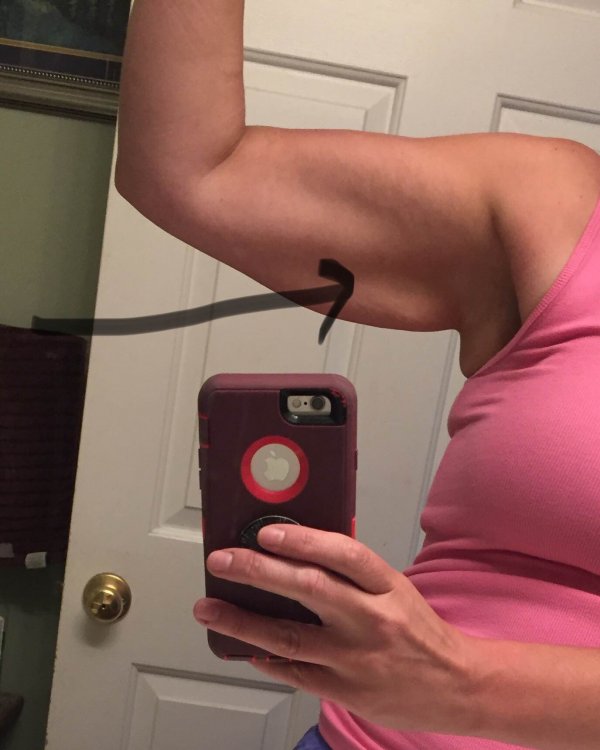
Omg what an amazing transformation!!! How did you get those non flapping arms?lol What surgery did you have?


Congratulations you look awesome and thanks for sharing!!


Allie in SC


That's minor compared to mine. I started out with 23 in arms and now at 18 in. So I have like 5 inch hanging and I still have about 90 lbs more to lose.


I had the bypass, totally life changing
My arms started out ~15 inches and are currently about ~11 inches. I have been really diligent about building muscle and taking my collagen and protein. Plus I think genetics play a huge roll in how our skin reacts

Join the conversation

You can post as a guest; create a free account to track replies, follow topics, and be part of the largest weight loss surgery community.

Join the conversation

You can post now and register later. If you have an account, sign in now to post with your account.

Guest
Reply to this topic...

Account

Navigation

Search

Search

Configure browser push notifications

Chrome (Android)
  1. Tap the lock icon next to the address bar.
  2. Tap Permissions → Notifications.
  3. Adjust your preference.
Chrome (Desktop)
  1. Click the padlock icon in the address bar.
  2. Select Site settings.
  3. Find Notifications and adjust your preference.