




Skip to content
View in the app

A better way to browse. Learn more.

BariatricPal

A full-screen app on your home screen with push notifications, badges and more.

To install this app on iOS and iPadOS
  1. Tap the Share icon in Safari
  2. Scroll the menu and tap Add to Home Screen.
  3. Tap Add in the top-right corner.
To install this app on Android
  1. Tap the 3-dot menu (⋮) in the top-right corner of the browser.
  2. Tap Add to Home screen or Install app.
  3. Confirm by tapping Install.
  • Appearance

Join BariatricPal free

  • Ask your own questions
  • Reply and follow topics
  • Message other members
  • No cost, no spam

What means "Chats" option?

  • Replies 12
  • Views 1.5k
  • Created
  • Last Reply

Top Posters In This Topic

Most Popular Posts

  • Christinamo7
    Christinamo7

    Thank you! you've just made my visits a lot more pleasant! I sure do appreciate it!

  • WLSResources/ClothingExch
    WLSResources/ClothingExch

    @@Alex Brecher, thanks, but the "chats" link isn't working for me. I get a "website is offline - error 502 -- bad gateway" message. (Same or the other link you gave.) Further, my 'Ignore' Prefere

  • WLSResources/ClothingExch
    WLSResources/ClothingExch

    @@Alex Brecher, I just noticed something that may change things. I have a lengthy list of "ignore" people only because, long ago, I did a wholesale blocking out of all "Signatures." I can't even re

Posted Images
Featured Replies

I stumbled upon the "'Ignore' Preferences" page and saw among the headings "Messenger" and "Chats." I know and use the former, but can't guess at "Chats." Please explain. Might I have partaken unaware?

http://www.bariatricpal.com/chat/

Sent from my iPhone using the BariatricPal App

Thank you! you've just made my visits a lot more pleasant! I sure do appreciate it!

  • Author

@@Alex Brecher, thanks, but the "chats" link isn't working for me. I get a "website is offline - error 502 -- bad gateway" message. (Same or the other link you gave.)

Further, my 'Ignore' Preferences click-upons don't work. When I click "show" to unshow and "remove" to remove, I'm told that my "secure key" doesn't match my identifier or something like that.

Edited by WLSResources/ClothingExch

@@Alex Brecher, thanks, but the "chats" link isn't working for me. I get a "website is offline - error 502 -- bad gateway" message. (Same or the other link you gave.)

Further, my 'Ignore' Preferences click-upons don't work. When I click "show" to unshow and "remove" to remove, I'm told that my "secure key" doesn't match my identifier or something like that.

These features are currently only available on desktop browsers or via a mobile browser on your device. They're not available via our app yet.

  • Author

These features are currently only available on desktop browsers or via a mobile browser on your device. They're not available via our app yet.

I'm here only under the aegis of my laptop (windows 7 with firefox), never anything else. No app-y stuff for me.

This link is to the message I get when I click on any of the Ignore options. I tried to copy/paste yesterday, but it wasn't happening: www.bariatricpal.com/index.php?app=core&module=usercp&tab=core&area=removeIgnoredUser&authKey

Any ideas for a solution?

_______________________________________________

Shoot, even the link doesn't work. Here's the message: "Your secure key, used to verify your identify, did not match the one submitted. Please go back, reload the form, and try again." This bracketed number appears alongside the message: [#1021523.3]

It's Greek to me. I switched over to IE, which I hadn't used in years, with the same, fruitless result.

Edited by WLSResources/ClothingExch

These features are currently only available on desktop browsers or via a mobile browser on your device. They're not available via our app yet.

I'm here only under the aegis of my laptop (windows 7 with firefox), never anything else. No app-y stuff for me.

This link is to the message I get when I click on any of the Ignore options. I tried to copy/paste yesterday, but it wasn't happening: www.bariatricpal.com/index.php?app=core&module=usercp&tab=core&area=removeIgnoredUser&authKey

Any ideas for a solution?

_______________________________________________

Shoot, even the link doesn't work. Here's the message: "Your secure key, used to verify your identify, did not match the one submitted. Please go back, reload the form, and try again." This bracketed number appears alongside the message: [#1021523.3]

It's Greek to me. I switched over to IE, which I hadn't used in years, with the same, fruitless result.

Your URL isn't formatted right.

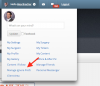
  • Go to the top right of our site where it says "Hello WLSResources/ClothingExch"
  • Click on the gears icon:
  • Screen Shot 2016-04-17 at 3.51.55 AM.png
  • Click on Manage Ignore Prefs
  • Author

@@Alex Brecher, that's pretty much what I've been doing.

Whether I click on "Hello WLS...," or the little bust in a circle to its left or the little gear to its right, I get the same dropdown menu. The three visuals are one click-upon. Is that as it should be? I clicked "Manage Ignore Preferences" and "Remove" yet again and got the same 'error -- Your security key is no good' message. Same when I click "Show" under the Posts column; I expect that should turn off "Show?"

Edited by WLSResources/ClothingExch

  • Author

@@Alex Brecher, I just noticed something that may change things.

I have a lengthy list of "ignore" people only because, long ago, I did a wholesale blocking out of all "Signatures." I can't even recall how/where I accomplished it.

Now there are some individuals I want to see nothing or as little of as possible. When I click any of the other elements (posts, chats, etc.) alongside their names on my Ignore list, I get that error message about security key. When I enter one of the screen names in the bar at the bottom of the Ignore screen and click the elements to make them disappear, I get a message that the individual is already on my ignore list, as though I can't extend the ignore instructions beyond the Signature.

What can we do to remedy this?

@@Alex Brecher, I just noticed something that may change things.

I have a lengthy list of "ignore" people only because, long ago, I did a wholesale blocking out of all "Signatures." I can't even recall how/where I accomplished it.

Now there are some individuals I want to see nothing or as little of as possible. When I click any of the other elements (posts, chats, etc.) alongside their names on my Ignore list, I get that error message about security key. When I enter one of the screen names in the bar at the bottom of the Ignore screen and click the elements to make them disappear, I get a message that the individual is already on my ignore list, as though I can't extend the ignore instructions beyond the Signature.

What can we do to remedy this?

I've verified that this is a bug. We'll let you know once it's resolved. Thanks for reporting this issue!

Join the conversation

You can post as a guest; create a free account to track replies, follow topics, and be part of the largest weight loss surgery community.

Join the conversation

You can post now and register later. If you have an account, sign in now to post with your account.

Guest
Reply to this topic...

Account

Navigation

Search

Search

Configure browser push notifications

Chrome (Android)
  1. Tap the lock icon next to the address bar.
  2. Tap Permissions → Notifications.
  3. Adjust your preference.
Chrome (Desktop)
  1. Click the padlock icon in the address bar.
  2. Select Site settings.
  3. Find Notifications and adjust your preference.

