




Biotin- chewable before and after bypass
- Replies 3
- Views 813
- Created
- Last Reply
Top Posters In This Topic
-
Dream4tc 1 post
-
TXMissy 1 post
-
jamiemarie_11 1 post



Popular Days
Most Popular Posts
-
I'm currently taking the it works skin, hair and nails. My hair is falling out and not growing in as quickly as I'm losing it. What is there is growing like a weed. My nails are nice and thick and str
-
I have been using them. I'm pretty op and will use them post op.
Posted Images
Featured Replies
Join the conversation
You can post as a guest; create a free account to track replies, follow topics, and be part of the largest weight loss surgery community.
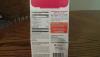
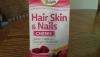
Has anyone used these Biotin chews before or after bypass? If so, will they absorb? How well do they work ? I understand that it takes awhile for Biotin to get into your system. I want to prevent hair loss if possible. I have pretty thick hair ,but would like to keep it that way after bypass. I bought these at Walgreens because they were on sale and they have 5000 mcg of Biotin. They are gluten free. Below is picture of front and back with nutrition info. I tried one already. It was a pleasant berry flavor. They come 30 in a package. I paid $6.99. Looking to hear from others about what you use.