whatever
LAP-BAND Patients
-
Joined
-
Last visited
-
So far I haven't had any plastic surgerys. I don't know if I will. My insurance is not wanting to pay for anything, and I don't know if it's worth it to me to pay cash. If I do fix anything it would be my arms. The rest doesn't look too bad. Yes, it could be tighter... But I am 52 yr old... Some sagging is acceptable at that age, right? As to why I have been successful when others aren't... I don't know. I was scared at first that I wouldn't be. It was alot easier than I thought it would be to be honest. I think it was a mind set thing. The first couple of times I overrate and ended up with the chest pain followed by needing to "throw up or die" it was so awful that I finally found the point where one more bite is going to take me to that place, and I stopped eating. Sometimes I could eat enough to not look ridiculous... at other times I might be 3 or 4 bites into a meal, and that was all I could comfortably eat. Around Chridtmas last year I had to go get all the Fluid removed because something was going on, and I was at the point where I couldn't even drink Water without having to throw up. I was actually 20 lbs below my goal and looking pretty bad (yes, you can be too skinny). When they let it out there was 4 cc in it. I went back a month later when I had gained back 10 lb and had them put in 1/2 cc and that's there I have been. I still don't eat alot. I don't snack, and I don't try to get around it by eating things that are easier to pack in. I still have difficulty eating meat, and have made an effort to get Protein shakes whenever possible. I had a friend who did it, and she barely lost any weight. I can say everytime I saw her she was "grazing". My advice is not to do that. Some people think that you "have to eat" a certain amount to be healthy. No, you don't. It's that kind of thinking that got you where you ate, and it will keep you there too if you let it. The only thing I "graze" on is sunflower seeds (the ones in the shell) I have heard that you expend as much energy shelling them as they supply in calories. I don't know about that... But it takes me all day to eat a bag... and keeps me satisfied. My Dr. Is thrilled too. He had tried to talk me into a bypass at first because he was afraid I wouldn't be able to lose enough... But I did.
-
-
Hi, I am a nurse I Los Angeles. I was banded in 4/2010 and I have lost a total of 130 lb. In response to how soon we could go back to work... I am probably an exception, but I didn't take any time off at all. I didn't want anyone at work to know because I was afraid I wouldn't lose any weight, so I worked Frr, Sat, and Sunday ( 12 hr shifts), had the surgery on Monday, and was back to work Thur, Fri, and Sat. I am a labor and delivery nurse, so it is pretty physically demanding. Sandy
-
-
-
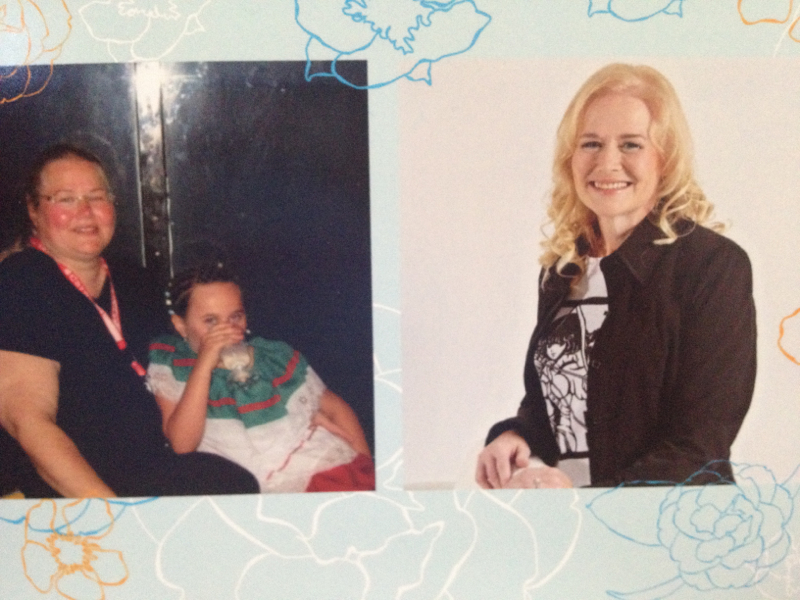
Had my lap band 2 years ago this week. I went from size 26 to size 8 and lost 130 lbs... Thanks to USC's phenomenal team!

-
I just woke up, having the same problems. Its really wierd too because I was doing fine. About 3 months ago I was about 35 lb from my goal weight, having no problems .... when suddenly I went through a spell where every time I ate, I had to go throw up. I would just be so uncomfortable that the only way to get past the pain was to throw up. It started with food, then it got so bad even Water made me throw up. I tried to just roll with it because I was really losing weight... in fact in a little over a month I lost 40 lbs. Finally I had enough... I was aspirating in my sleep, throwing up all day... I went back to my lap band doctor and he removed some Fluid... and I was fine again. Now about 2 months later, it has started again! I didn't have a fill so I am not sure why it began again... but I am throwing up all day and waking up every night choking. I have only lost 10 lb so it is not as bad as before... but I am abot 5 lb under my goal. I am afraid to go back to my Dr. I don't want to remove more fluid because I am afraid I will regain my weight as others have said they did... but I ama getting sick of waking up choking. I have even started throwing up before I go to sleep every night in hopes of getting rid of whatever I may choke on later, but it doesn't seem to help... my stomach just makes more. Any ideas why a band that hasn't been adjusted in the last few months would get tighter on its own like that?
-
My Before & After Photos!
-
I also went to USC, Dr. Peter Crookes was my surgeon. I couldn't be happier with the care I received, or the outcome. I have been at goal now for about months. I lost 136 lb... went from 296 to 170. Everyone at USC treated me professionally, and the care was excellent.
-
Katy, I am sorry you still have some pain! My insurance was reluctant to pay because the original request to revise had made it sound like we needed to revise the pouch rather than te port. Once it was clarified ( through filing a grievence) they approved it. I had a talk with the surgeon before we went to the OR the next time and let him know that, whever he was planning to move it to... I did not want to be able to see or feel the port after this operation. He did a good job of making it happen. Afterward he said that what had happened was that 2 of the 4 stitched areas securing the port had broken free, so instead of laying flat, it was standing up... And in that position there was no way to fill it as the needle was entering parrallell to the port. My real concern now is that after being banded in May and not being ant to get it filled until November. I worry that I msy not be inthe right "mindset" to be successful. At first it's new, and you are sure you have found the thing that is really going to work for you. Then you get it done... And I lost 20 lb... But it was through dieting rather than the lap band doing much... Then that tapered off... And after a while it felt to me like the lap band was going to be one more failed diet attempt. Now that I have had my first fill i am trying to get back the optimism I had at the beginning... But there is still the self doubt that makes me afraid this too will not work. I am really hoping that I will see results that will give me some hope that this time things are going to be different.
-
I had lap band in May of this year, and almost immediately I suspected there was a problem. The incision where my port was stuck out really far... in fact it looked really bad. It was below my left breast, and was about as big as my left breast. At first the surgeon said it was a bad hematoma and it would resolve... but it didn't seem to do so, plus I could feel the port easily. The surgeon didn't want to inflate my lap band until the hematoma resolved. A week or so later I noticed it was migrating North and now set on top of my rib cage... so it looked even worse. The surgeon finally did try twice to inflate it... poking around for about 20 min each time! He was not able to find the injection site. Finally in July when it became apparent it was not going to work, the surgeon admitted there was something wrong. I spent the next 4 months trying to get insurance to authorize a second operation to replace the port. Last week I finally had my first fill.... Here's hoping it will be smooth sailing.
-
I was banded May 19th- so far no fill, but hopefully that will change on the 7th, I am down 20 lb, But, it is not easy. Hopefully it will get easier once I get a fill. I am looking for friends and support. The thing I started to keep me in check was weight watchers. I know it's lame and I couldn't do it before. But the band makes me able to follow WW
-
I am in the exact same place. I was banded on May 10th and am finally supposed to have a fill on July 7th. I have lost about 20 lbs, but I am beginning to think that is all I am going to lose. I constantly fight my appetite to try not to get back to where I was. Even worse that port sticks out so badly already that it bugs me constantly. The reason the surgeon delayed doing any fills to this point was that he thought I might have a hematoma under the port which might resolve ... but no, its just the port which seems to be on top of my bottom rib on the left. I am very disillusioned. I guess I fell for the advertisements, and thought this would be the thing that would get me where I wanted to be. Now I realize it probably isn't going to make a difference, at the end of the day weight loss is a combination of self denial and hard work. I should have just dieted w/o the lap band and then I wouldn't have had this huge port protruding like some horrible tumor. Things may get better... I am hoping after I get my 1st fill I will find losing the weight to be less of a struggle. But as for the port, who knows. Others on this site continue to have the same complaints about theirs. At this point if someone asked me "lapband or bypass" I would say bypass may have been a better decision. You don't have to diet with a bypass, and there is no obvious physical deformity afterward like there is with a lapband. If I had possessed the willpower to lose all the weight I need to lose on my own I wouldn't have gotten a lapband. :scared2:
-
I saw my Dr.and he says it is the port site. It is on my left side under my breast, about the level of my lowest rib. He says it is a heamtoma, and that it will be absorbed in 4-6 weeks. I have notice it has gone down somewhat. I think what I have now is just my port. It bugs me a little that it sticks out (I was hoping it wouldn't be as noticeable) but I guess its ok until I have lost the weight. After that, maybe I will get it removed, or replaces with a "slimline" style port like I have seen others say they plan to do.
-
For not having a fill yet you have done really well so far.I was just banded on May 10th so I don't have any Fluid in my band yet either. I have seen various information for people before their first fill.... some say not to expect to lose weight yet since you are not restricted, others like you appear to have lost significant amounts of weight despite the lack of restriction. I have only lost 12 lb so far, but its only been 3 weeks so I am not going to kick myself for it. I haven't been as active as I know I need to be, but I had other health issues that were zapping all my energy (I work full time too so I am tired alot when I get home). The good news is that the other health issue was addressed yesterday and I am looking forward to more energy so I can start to exercise a bit. Anyway, my problem after being banded was once I realized you still have to diet (and thought geez- maybe I should have chosen the gastric bypass after-all). I decided that just eating whatever I wanted but in smaller portion sizes was probably not going to get me too far. I decided to join weight watchers so I could have more structure in my food selections. I had tried weight watchers in the past - as I am sure we all have, but now I am able to stick with it because I am not hungry so I don't cheat. Its good that you are getting a fill finally. Your insurance company has really been undermining your success by making you wait so long to get one. I am getting my first fill on 07/06/10 ... I am a little nervous (I don't do needles well)... but if this is going to work, a fill is needed. Keep up the good work.
-
My sister is a pharmacist (and *really* smart) so I asked her about what I could do about my hematoma problem. She couldn't suggest anything for me as I don't have any external problems... Mine is just a hardened lump under my incision. However if I do start bruising, she said there is a herbal topical treatment that many doctors tell their patient to use for bruising. It is called Arnica. She said that some pharmacies carry it, but morelokely you can get it at a GNC, or online. It gels clear up bruising fast.
-
Ok-so I saw my doctor, and you guys are right... It's the port site. It seems I have developed a fairly good sized hematoma under the port, so whenever I eat, my stomach swells, which pushes up the hematoma, making it more pronounced. The Dr says he could drain it, but he is hoping it will resolve on it's own "in about 6 weeks". I am hating this thing. It looks ridiculous! I am just praying it goes away, because I have seen posts by people who say theirs never went away, but became scar tissue instead. Did anyone else have this problem?
-
Do you mind me asking what happened? Did it end up getting reabsorbed like they said it would? I was banded on 05/10 and I have the sane thing... And was told the same information. If so did it go away a little at a time? I am really worried because it is very uncomfortable, and looks awful!