




Skip to content
View in the app

A better way to browse. Learn more.

BariatricPal

A full-screen app on your home screen with push notifications, badges and more.

To install this app on iOS and iPadOS
  1. Tap the Share icon in Safari
  2. Scroll the menu and tap Add to Home Screen.
  3. Tap Add in the top-right corner.
To install this app on Android
  1. Tap the 3-dot menu (⋮) in the top-right corner of the browser.
  2. Tap Add to Home screen or Install app.
  3. Confirm by tapping Install.

IndyJojo

Pre Op
  • Joined

  • Last visited

Everything posted by IndyJojo

  1. I appreciate your help. I will stay the course and try harder. Here is what they told me. Have a great day
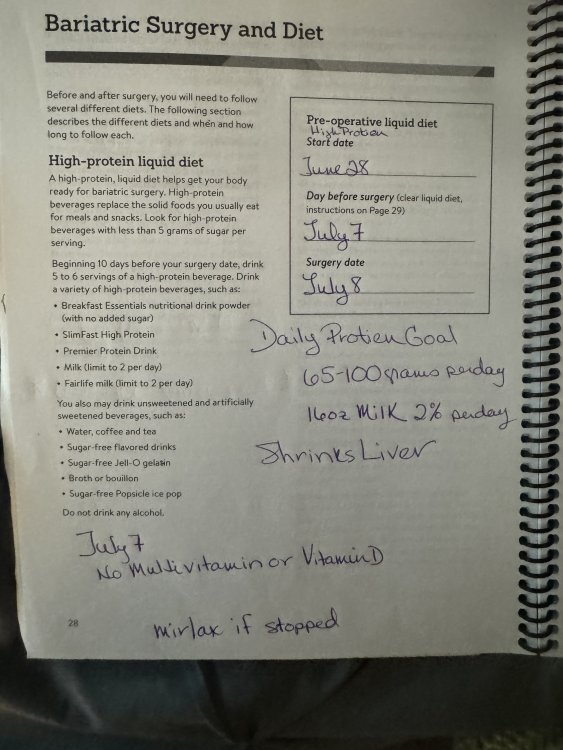
  2. Thank you for your response. What about V-8 juice would that be alright to drink.
  3. I have been on the liquid diet for 6 days and have lost only one pound. I have been using premier protein shakes and bone broth. Is this about cutting sugar or what ? I am frustrated and confused and it is July 4 and I cannot call and ask anyone. My surgery is Monday

Trending Products

PatchAid Vitamin Patches

Account

Navigation

Search

Search

Configure browser push notifications

Chrome (Android)
  1. Tap the lock icon next to the address bar.
  2. Tap Permissions → Notifications.
  3. Adjust your preference.
Chrome (Desktop)
  1. Click the padlock icon in the address bar.
  2. Select Site settings.
  3. Find Notifications and adjust your preference.