felicial
Gastric Sleeve Patients
-
Joined
-
Last visited
-
felicial changed their profile photo
-
-
-
-
 felicial reacted to a post in a topic:
What Your Doctor Didn’t Tell You Before Weight Loss Surgery : Food Edition
felicial reacted to a post in a topic:
What Your Doctor Didn’t Tell You Before Weight Loss Surgery : Food Edition
-
felicial reacted to a post in a topic:
What Your Doctor Didn’t Tell You Before Weight Loss Surgery: Stalls ‘n’ More
-
-
-
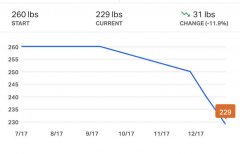
Progress photos and graphs
-
Dr. Christopher Carlson performed my gastric sleeve surgery on December 10th, 2019. His honesty and bedside manner is what I appreciate most about him. He doesn’t sugarcoat anything, yet he is able to put my mind at ease with his positive attitude. I had no complications, besides not doing well with the morphine they gave me after surgery. After the dry heaving from the pain medicine subsided, my pain was minimal, and my incisions healed quickly. Dr. Carlson and his team prepared me as much as possible before the surgery, and they made sure I had all the information I needed after the surgery. I would highly recommend him to anyone in the Augusta area and beyond.
-
-
-
-
Great question! My surgery is also scheduled for Dec. 10th, and my doctor hasn't mentioned a binder. So, I'm not sure if it's needed. Thoughts anyone?