
SkyJade
Gastric Sleeve Patients
-
Joined
-
Last visited
-
-
-
-
-
-
-
-
-
-
-
-
-
-
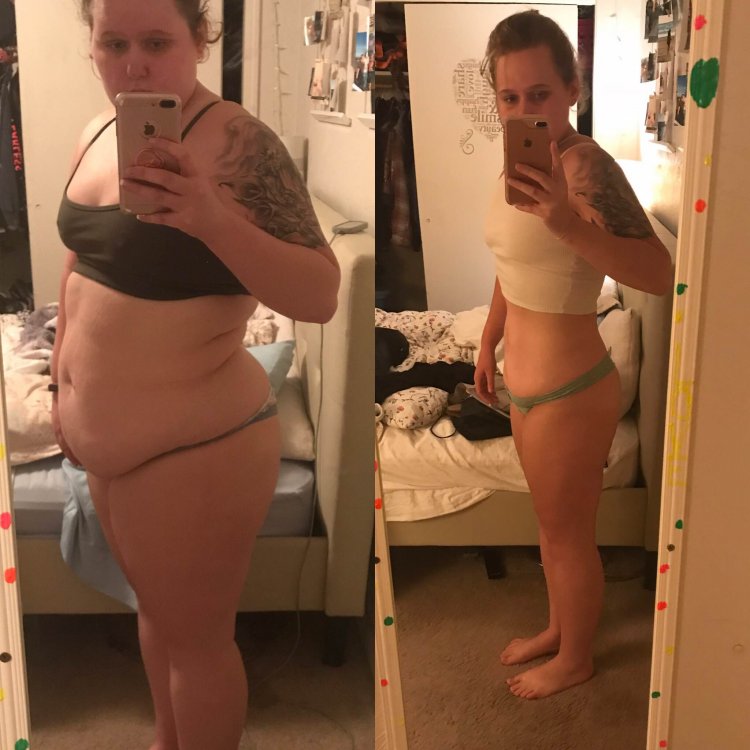
Almost 5 pounds away from being 100 pounds down! Sleeved February 12 2018
-
Ive had some complication like getting kidney stones from dehydration. Worst pain I have ever felt, but other than that I’ve been I think doing pretty okay. Now that the stones are gone it’s time to get back in the gym! VSG 02-12-18 HW:262 SW:235 CW:207 GW:140 55 lbs [emoji652]️
-
Hello, well I’m not having my surgery in summer, but I had it on February 12th! I’m 21 and will be 22 in June! I haven’t met someone my age who has had the surgery. I’ve also been over weight all my life and decided that I did not want to go though nursing school overweight! If you have any questions I’m all ears! HW:262 SW:235 CW:216
-
-
I just had my 2 week check up! I got cleared for soft foods and to resume my normal exercise!! I’m so excited I feel like the hard part is over and I can start really living my life.. well what my new normal is! HW:262 SW:235 CW: 219
-
-
 SkyJade reacted to a post in a topic:
Am so tired of people who ask every ten minutes why they're not losing weight
SkyJade reacted to a post in a topic:
Am so tired of people who ask every ten minutes why they're not losing weight
-
SkyJade reacted to a post in a topic:
Am so tired of people who ask every ten minutes why they're not losing weight
-
Same! My sleeve will not tolerate it I’m in so much pain when I do eat it and I hate yogurt so I’m trying to find something else that could work..
-
Thank you so much! A nurse called me today to check in on me and I asked her about it and she said that’s what I was supposed to be doing... I’m blaming it on surgery brain!
-
I had a lot of pain yesterday as well. I went back to school on Wednesday which I think was a mistake. I woke up in pain with a headache and very nauseous. I ended up throwing up all my vitamins and had slow going day. I still have had pains in my shoulders and trying to get all my water in but with the protein drink it seems almost impossible.
-
-
That’s sooo great to hear! I went back to school today can totally tell that my energy is down and I’m not as attentive as I usually am. I’m getting all my protein in so I’m super happy about that!
-
-
Good luck! You can do it! I hope everything goes as easy and less painful as it can be! Keep us updated!
-
-
same broth jello and water.. and I don’t like tea. I am getting discharged in 30 so I’m stoked! I hope you feel better!!!! Let me know how you do!
-
SkyJade changed their profile photo
-
Same yesterday I woke up and was like what the hell did I just do to myself. Today I feel so much better. Trying to get all the air and gas out! How are you doing are you getting your liquids down okay?
-
How are you doing?
-
Had mine this morning.. well yesterday morning. Surgery was quick wasn’t expecting the gas pain to be this bad, I’m so thankful I have had incredible nurses. I’m swallowing water fine but once it gets down to the stomach I have a little discomfort! Good luck everyone!
-
So, I don’t know if this has happened to anyone else. All of my life I have been an emotional eater hence why I am over weight, but since I started the process of getting the gastric sleeve my eating has changed. My surgery is scheduled for the 12 of February, and I am in college pursuing my nursing degree. I am stressed out all the time, so I am not eating and when I try to eat I feel sick. I have done a complete 180. I don’t know what to do I have lost 2 pounds in the last three days, and I’m worried it might get worse. Any advice? Don’t tell me to stop stressing that’s not going to happen
-
Does anyone know if there is a website where you can donate old clothes that don’t fit you for other bariatric patients, and smaller sizes for you when you need them so you don’t have to buy a whole new wardrobe? Or is it something that’s needs to become a thing lol