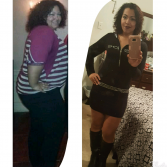
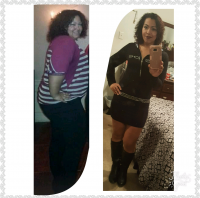
Dianna496
LAP-BAND Patients
-
Joined
-
Last visited
-
-
Dianna496 changed their profile photo
-
good Job... Its definitely easy to fall back on weight,, because Food taste so good! But keep it up and next time.. Once you notice a weight gain of over 20 pounds... Know you need some adjusting to your eating and get your lab band Filled again.
-
-
I love the Choice I made with Lab Band. I love the way people make me feel when They see Me and I have Lost and Kept my weight off. I have not gotten A fill in over 2 years. I still eat small Portions, I try to never Over eat because your Brain does not tell you to stop eating. So if you serve yourself alot of Food, your gonna be eating alot and feeling sick, because your Mind sees it and wants it... but you shouldn't. I Did this surgery because of my High Blood Pressure and because it was so hard for me to loose weight with diet and exercise. I feel Great!! I love showing of my body, cause it has fallen back into place.. The Only thing I do have is my Arm FLAPS.. not to much,, Like I dont mind wearing sleeveless shirts but.. I hate going out Dancing unless I have Some Sleeves because I feel as if, I flap a little more I might FLY. LMAO. Other than that Im pretty Content that I Chose the Lab band!