Skip to content
View in the app

A better way to browse. Learn more.

BariatricPal

A full-screen app on your home screen with push notifications, badges and more.

To install this app on iOS and iPadOS
  1. Tap the Share icon in Safari
  2. Scroll the menu and tap Add to Home Screen.
  3. Tap Add in the top-right corner.
To install this app on Android
  1. Tap the 3-dot menu (⋮) in the top-right corner of the browser.
  2. Tap Add to Home screen or Install app.
  3. Confirm by tapping Install.
  • Appearance

Join BariatricPal free

  • Ask your own questions
  • Reply and follow topics
  • Message other members
  • No cost, no spam

shanneman

Pre Op
  • Joined

  • Last visited

  1.    rs reacted to a post in a topic: I Want To See Before & After Pics! (Cont'd)
  2.    xylo_glow reacted to a post in a topic: I Want To See Before & After Pics! (Cont'd)
  3.    logicwand reacted to a post in a topic: One year post
  4.    logicwand reacted to a post in a topic: I Want To See Before & After Pics! (Cont'd)
  5.    habee reacted to a post in a topic: I Want To See Before & After Pics! (Cont'd)
  6. consultation date: April 9th, 2017 weighed in at 248 Surgery date : July 10th, 2017 weighed in at 236 July 10, 2018 - weight 155
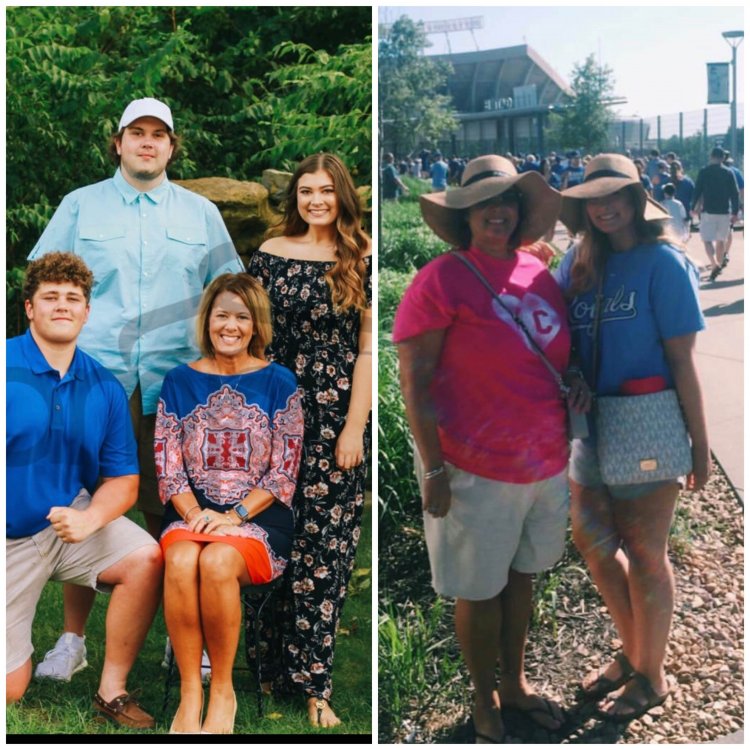
  7. Sherri - KC 44, married , 3kids, 2 dogs. Surgery date 7/10/17 HW 248 , SW 231, CW 215 (as of 1 week post op Dr. visit) I find myself trying not to focus on the # lost - and more about how much better I feel. Being diabetic for over 20 years and this week seeing my blood sugar #'s coming down. Currently on sliding scale of insulin. FIrst goal is to be completely off insulin. One month post op appointment next week.
  8.    nomorefattypatty reacted to a post in a topic: Pre-OP Liquid diet recipes
  9. Use crystal light packet in vanilla protein powder. using rasberry flavor , tastes like one of those creamy life savors.
  10.    FAT TWO FABULOUS reacted to a post in a topic: July
  11. July 10 - surgery date. Started pre op today.

Account

Navigation

Search

Search

Configure browser push notifications

Chrome (Android)
  1. Tap the lock icon next to the address bar.
  2. Tap Permissions → Notifications.
  3. Adjust your preference.
Chrome (Desktop)
  1. Click the padlock icon in the address bar.
  2. Select Site settings.
  3. Find Notifications and adjust your preference.